Okay, so big problem for an online gaming person. I am trying to find ways of decreasing my packet loss, and so far nothing has worked. I've made exceptions in my firewall for games, I've tried disabling my firewall and internet security altogether, and I've tried turning my router off and on again, to no avail.
Are there any tips you might suggest for fighting the curse of packet loss? My connection is fine for streaming films or tv on netflix, but as soon as I try to play a game, I get stuck with horrible ping and packet loss upwards of 50%
Might Java have anything to do with it? I know that it is used for quite a few browser based online games. Would it also affect something like War Thunder or TF2?
Are there any tips you might suggest for fighting the curse of packet loss? My connection is fine for streaming films or tv on netflix, but as soon as I try to play a game, I get stuck with horrible ping and packet loss upwards of 50%
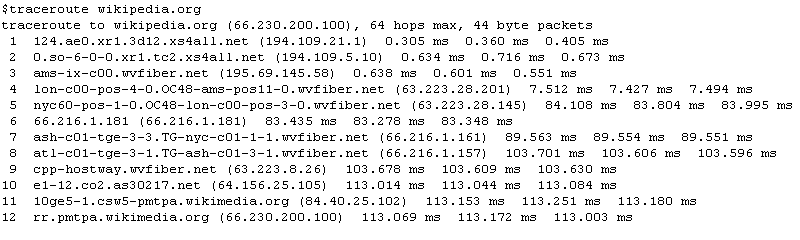
Can you run a trace route and show the results? Just in case - it's the tracert command in Windows, otherwise you use it like ping - as an example:
tracert google.com
This is not on Windows, but it's approximately going to be like this - slightly different formatting, though
Although you can just copy it from the command line, I think it's easier to actually save the output to a file, to do so, you need to use > (the greater than sign) and specify a file name. Example
tracert google.com > C:\output.txt
Obviously you can name the file whatever you want and also place it anywhere you want. At any rate, you need to know two things - first, if you run the command twice (or otherwise redirect to the same filename), the file would be overriden - you won't be asked or anything. Make sure it's not something you actually need. You can also just call them "file1.txt" and "file2.txt", etc. Second, if you redirect the output, you ARE redirecting the output - you won't get any visual feedback in the command line until the command finishes doing what it does. You can still open the file at any point and you'll see anything you normally would in cmd.
Anyway - mostly it's simpler to keep a record of what happened, and then it's easier to share, too.
And as a final one on this side note - if you use >>, you'll append to the file, instead of replacing its contents every time.
It would help if you run it when your connection is OK and when it craps itself. Also, might be stupid, but are you playing games roughly at the same time every day? What I'm trying to ask is - is it possible your connection to just suck in a certain timeframe that coincides with you playing online.
Soviet Heavy said:
Might Java have anything to do with it? I know that it is used for quite a few browser based online games. Would it also affect something like War Thunder or TF2?
I really highly doubt it - you do actually need to go and visit a website with a Java game on it for it to run. And even then, I don't think there are THAT many browser applications on Java running out there - my Java plugin is turned off and has been for the past 3 years or so (for, like 99% of the time) - I've not really encountered much stuff that wasn't working because of it. Pretty much close to 0, aside from some Java tutorial stuff. And even with that said, normally Java shouldn't really interfere much with anything, unless it just uses a shitton of traffic and thus gets you throttled somewhere down the line but it's really, really a stretch - that assumes you are using a Java application and it's going haywire and you're playing TF2 or whatever at the same time.
Really, aside from (or "in addition to") Java, you can always check what is using your network:
go to Task Manager (Ctrl + Shift + Esc) -> Performance tab -> click the Resource Monitor... button -> select the Network tab
This would give you a lot of information about network usage on your PC - what process is using how much bandwith and what it's connected to and other stuff. One thing I'd immediately check there is the TCP Connections graph on the right - see if you have A LOT of connections, some time that might be a problem depending on your connection. Well, it's somewhat hard to say what "A LOT" would be, as it does depend on the ISP and/or router and maybe other things but generally if some time when you're well over 100 - 150-200 would be the lowest possible "A LOT" amount I've seen but it does vary - could be 500 or more. Overall, for your case, I probably won't be worried if you have less than 200-ish TCP connections.
Finally, you might want to turn off anything that creates virtual network interfaces, such as Hamachi or its ilk, assuming you don't use it. I've occasionally had problems with that.
This site uses cookies to help personalise content, tailor your experience and to keep you logged in if you register.
By continuing to use this site, you are consenting to our use of cookies.