Computer question - Fixed :D

Recommended Videos

Thandran

New member
Feb 19, 2011
183
0
0
Hey guys,

I'd like to ask you something. I'd like to play videogames on a 1920x1080 resolution but everytime I put it on that setting the game starts horribly lagging. Since I'm not very well versed in computers (yet, I'd like to change that) I did some digging around the internet and found out that higher resolutions can become very taxing on your graphic cards.

I've downloaded a program called SIW (http://www.gtopala.com/) which some advocated for and it shows that I have two cards:

- Intel HD Graphics 3000 (GT2+)
- Nvidia GeForce GTX 560 Ti

Would you advise me to invest into a new graphic card(s?) or are ther other solutions? I don't need to have every possible slider maxed... but 1920x1080 on medium setting with 30+ FPS would be nice.

Thank you for your time. :)

 

Zaik

New member
Jul 20, 2009
2,073
0
0
Are you switching from the intel to the nvidia one when you play games? My laptop has two cards like that, and was supposed to switch on it's own when something came up the onboard one(which uses a lot less battery power) can't handle, but it never actually did and I have to manually change it in the control panel.
 

Thandran

New member
Feb 19, 2011
183
0
0
Zaik said:
Are you switching from the intel to the nvidia one when you play games? My laptop has two cards like that, and was supposed to switch on it's own when something came up the onboard one(which uses a lot less battery power) can't handle, but it never actually did and I have to manually change it in the control panel.
I don't know if it switches. :(

Would you be so kind and tell me how to switch manually? :)
 

number2301

New member
Apr 27, 2008
836
0
0
You've got a desktop not a laptop haven't you?

Anyway, is your monitor plugged into the graphics card, not the motherboard video output? The motherboard video output is with all the other USB/PS2/whatever ports, the video card is in one of the expansion slots.

Then make sure you've got the drivers installed. Steam can do that for you if you poke around in the options. Otherwise just go to the Nvidia website.

Given that you've got HD3000 Intel graphics you've got a fairly decent CPU, so there's no reason you should be able to run pretty much any game on decent settings. Next thing to check would be the amount of RAM you've got, 4Gb would be plenty. Windows Task Manager can tell you how much you've got.
 

ohnoitsabear

New member
Feb 15, 2011
1,233
0
0
A 560 Ti should be enough to play most games at 1920x1080 on medium-high settings (if not max) at a very playable framerate.

But it's probably a driver issue or you have the monitor plugged into the motherboard instead of the graphics card (although, from my experience, this usually just makes the screen go black, although I haven't seen what happens on newer computers).
 

oplinger

New member
Sep 2, 2010
1,718
0
0
Well, if you're using integrated graphics, hands down, they're pretty bad compared to a dedicated card. (Shared resources with everything else) If you're plugging into the card, and don't have it's drivers installed, it's about as bad as using just the integrated graphics. Windows usually has it's own set of generic drivers, but it'd be better to h ave the real ones installed.

So check which you're plugged in to, and go about installing the drivers for the card (or reinstalling)

If it's a laptop, check the settings, there should be an option to pick which card it's using.

Also check to see if the game has any bottlenecks, like..is the game CPU heavy? GPU heavy? Is the software engine limiting?

Like, GTA4 on the PC does pretty much everything through the CPU. FEAR has a bottleneck of resolutions higher than I think 1024x768.

So, yeah...there's all that.
 

Thandran

New member
Feb 19, 2011
183
0
0
Hope I'll answer some of the questions:

- I have a desktop
- I have 8GB of RAM
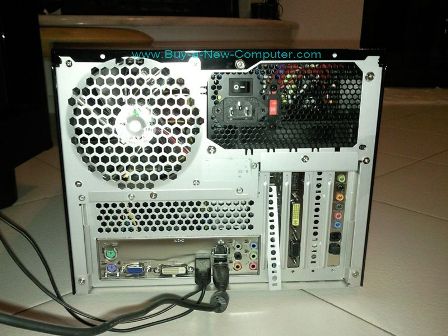
- I don't know where I have the monitor plugged in... I'd need a picture that would show me where the motherboard ports are and where the dedicated video card ports are.

Thank you for your help in advance though. :D
 

Loop Stricken

Covered in bees!
Jun 17, 2009
4,722
0
0
The dedicated video ports will be in a strip on the back of the PC that looks like it might be dedicated to one thing. Like, a video card where you can plug in your monitor.

Only so many places a monitor can connect to.

Regardless, check in the Control Panel which video card is actually active.
 

Mekado

New member
Mar 20, 2009
1,282
0
0
Thandran said:
Hope I'll answer some of the questions:

- I have a desktop
- I have 8GB of RAM
- I don't know where I have the monitor plugged in... I'd need a picture that would show me where the motherboard ports are and where the dedicated video card ports are.

Thank you for your help in advance though. :D


The "Good" video port would be on it's own in one of the independant slots (on the right in picture). The integrated card (which you don't wanna use) would be on the "general" plate on the left, with the usb ports,network card, sound jacks,etc...


Dryk

New member
Dec 4, 2011
980
0
0
I have a 560 Ti and... well actually I haven't really tested its performance on recent games yet. But Space Marine and Human Revolution seemed to run okay, I might go check what it runs them at... I know it can run TF2 at 120-300 (turns out there's a cap) depending on how much is happening though.

I only have a 1600x900 monitor though, and that's only 69% of the pixels yours is

Zaik said:
Are you switching from the intel to the nvidia one when you play games? My laptop has two cards like that, and was supposed to switch on it's own when something came up the onboard one(which uses a lot less battery power) can't handle, but it never actually did and I have to manually change it in the control panel.
I had that problem with my laptop, there was an Auto/Off switch on the outside next to the Wifi card switch. What model is it?
 

Thandran

New member
Feb 19, 2011
183
0
0
Thank you Mekado. :)

Judging from this picture I'm plugged via an HDMI cable on the bad side. How do I get on my computers good side? Theres loads of possibilites to connect there but none on the other side. :/
 

Dryk

New member
Dec 4, 2011
980
0
0
Thandran said:
Thank you Mekado. :)

Judging from this picture I'm plugged via an HDMI cable on the bad side. How do I get on my computers good side? Theres loads of possibilites to connect there but none on the other side. :/
Can you take a picture? My 560 has 2 DVI ports and a mini-HDMI port, and came with a mini-HDMI to HDMI adapter... but different card manufacturers maybe?

Also if it does, and the adapter doesn't fit because of your case don't worry. It's a common problem and there's heaps of excess plastic on the side, so you can just file it down.


Mekado

New member
Mar 20, 2009
1,282
0
0
Thandran said:
Thank you Mekado. :)

Judging from this picture I'm plugged via an HDMI cable on the bad side. How do I get on my computers good side? Theres loads of possibilites to connect there but none on the other side. :/
Well, most GTX560Ti are actually DVI-only they have no HDMI, still you'd get much better results using your "real" card anyways...

If you can provide a picture of your backplate i can point out where you're supposed to be connected.

P.S. if you have the exact model of your card, you can check if there's supposed to be HDMI connectors. The GTX560Ti should be more than able to run anything recent at the very least on medium details and high resolution.
 

Thandran

New member
Feb 19, 2011
183
0
0
[http://postimage.org/image/ypwwa9juf/]

Here you go. I've marked where it's plugged in. Thank you for your help. :D
 

Dryk

New member
Dec 4, 2011
980
0
0
Yeah that's definitely the onboard graphics output, the DVI cable (white one further down) is where the graphics card output is
 

Thandran

New member
Feb 19, 2011
183
0
0
I know I'll sound like a total noob but... how do I connect to the graphic card output? Disconnect the HDMI and ...?

Sorry for being so thick. -__-
 

Mekado

New member
Mar 20, 2009
1,282
0
0
Dryk said:
Yeah that's definitely the onboard graphics output, the DVI cable (white one further down) is where the graphics card output is
I agree :)

Although a DVI cable is already there, did you connect your monitor with both cables or... ?
 

Dryk

New member
Dec 4, 2011
980
0
0
Depends, do you have the same ports as my model? (images above). If so you need to find the adapter if you still have it and then yeah just plug everything in and it should work. It depends on what ports you have available though.

Also... where does that DVI cable actually go? Anyway, you're in good hands here... I gotta go have lunch out with my family.

EDIT: Dammit, ninja'd :p

And don't worry, we were all new to this once. Hell I still have no idea how it works, I just know how to put it together without it breaking down (most of the time). Tinkering with help on hand is easily the best way to learn.
 

Thandran

New member
Feb 19, 2011
183
0
0
Nope.

That one is disconnected and the HDMI cable is connected. The DVI cable leads to the monitor (it's the one beneath the green jack, right?) :)