

Linux... What version should I try and acclimitize to?

Recommended Videos

BeerTent

Resident Furry Pimp
May 8, 2011
1,167
0
0
So, some of you may have seen me around here, saying that, so far, for me... Windows is where it's at. I've grew up from DOS, to 3.1. To 95, 98, and then 2000 Worked professionally on XP, Vista, 7 and now 8. Windows an' me, are essentially second nature. I've grown so accustomed to it that I use the keyboard more than I use the mouse, if it's not an even 50/50 split. What takes you 20-40 clicks, takes me three keypresses and a tab.

I've started to want to fiddle with Linux, but I'm a busy tent, and I just don't have time to fuck around with code. I don't want to spend three hours to figure out how to use my wireless internet card, and I want to ensure that the software I use for video editing, programming, and gaming will all work on the platform.

So, this is what I'm looking for...

Does anyone know of a Linux Distro that has similar keyboard shortcuts and interface to Windows 7/8/10? One that's easy to setup, and doesn't require me to learn a new language? One I can test and build Unity projects with? Most importantly, one that doesn't require a lot of resources to run? And second most importantly, one that can handle most games new and old out of the box, possibly with Wine?

I kind of want to pick up Linux, because I'm not stupid. Windows 10 is acclimatizing customers to a different direction. (You could argue that 8 was too, but I only touched the store for the 8.1 update.) Quite frankly, I'm not interested. I don't want an Xbox, I have Steam. I don't want a store built into my OS. I have two feet. I don't need to use my voice to access functions in my OS if it means that data's getting sent elsewhere. Windows is going the way where it's data-mining more and more information, and well... I'm not too unlike Ron Swanson. ("Is that a picture of me? Take it down!!")

I've fiddled with Debian, Ubuntu, and Slax. Debian was more alien to me than OSX, Ubuntu requires extensive use of the console to get fucking anywhere, and Slax seems to have positively no support for internet connection devices on my laptop. For someone new to the Linux side of things, with only a minor amount of experience setting up Samba on a Linux server, What would you recommend I try? Can it run off of a flash drive? This is the test machine.(No games) [http://support.hp.com/za-en/document/c01489964]

 

Albino Boo

New member
Jun 14, 2010
4,666
0
0
Sounds to me that you want Linux distro to be like windows. You will be disappointed, there is a reason why Windows cost money and Linux is free. The go to distro for desktops is Ubuntu but as you know you will have to do some work. Most games will not work out of the box on Linux. Somewhere down the line SteamOs is aiming to be what you want, but you will have steam instead of the windows store and most games will not work on steamos. As to the software you want working. You will either have to run WINE and spend ages getting that to work or check that you favored software has linux versions. Fundamentally if you want ease of use don't go to linux.
 

DoPo

"You're not cleared for that."
Jan 30, 2012
8,663
0
0
BeerTent said:
I want to ensure that the software I use for video editing, programming, and gaming will all work on the platform.
I'm going to be straight here - that's not going to happen. Specific software, unless cross-platform by design, is not likely to be simply made to work. Perhaps it would work, perhaps it wouldn't - it really depends. Chaces are it wouldn't. However, there are usually alternatives. Especially when it comes to programming. Most big IDEs are cross-platform - maybe except Visual Studio (I don't know is yet but I don't think so) - it would be in the future, though. There are also a bunch more from simply more powerful text editors to light-weight IDEs that are either seconds away from installation or even come pre-installed.

BeerTent said:
Does anyone know of a Linux Distro that has similar keyboard shortcuts and interface to Windows 7/8/10?
First interface:
You can try Zorin OS [http://zorin-os.com/] - it tries to be really close to Windows. Erm, and that's what I know of it - I've not actually tried it. It's based on Ubuntu, so it should be OK.

Actually, I'm surprised you had problems with Ubuntu - it's one of the more beginner friendly distros. Mind you, I don't really like the stock Unity interface it comes with and I'd recommend anybody trying it at their own risk. Some people do like it but overall it's not really that standard.

I'd recommend getting Xubuntu or Kubuntu. They come with Xfce or KDE desktop environments, respectively (as opposed to the vanilla Ubuntu's Unity). I really like Xfce - it's lightweight and doesn't try to do a lot. KDE is slightly different in that it's a bit heavier weight and allows you to customize all sorts of stuff. Too many, perhaps, perhaps not. I actually prefer KDE - I think it looks better. Xfce is definitely my second pick, though.

I can also recommend trying out Mint - it's what I use, and I think it's fine. It's based on Ubuntu but it's a tad more...traditional, I guess - while Ubuntu tries to be far ahead, it tends to leap too far at points. It's what caused me to switch - Mint's release cycle is tied to Ubuntu's - it lags by a couple of months where the Mint team incorporate the Ubuntu changes and do some additional testing.

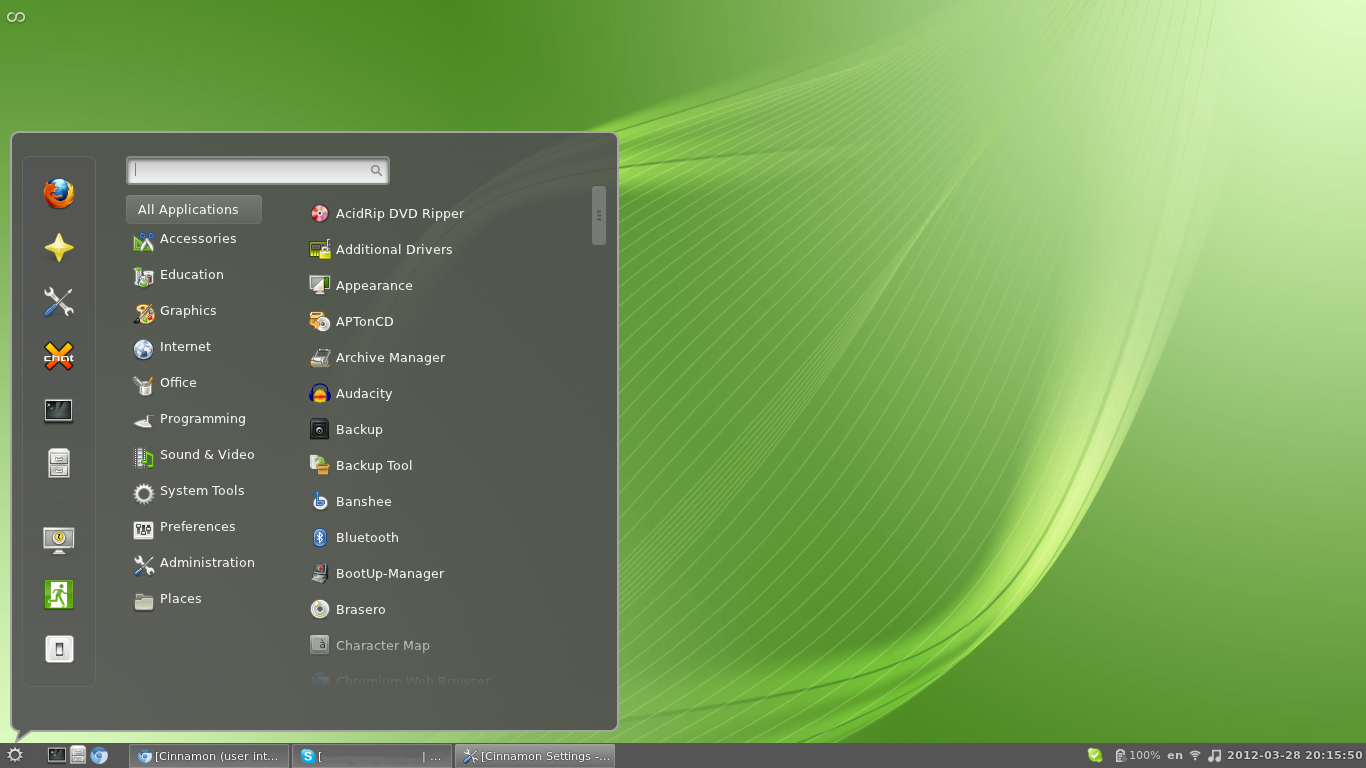
Mint also comes with choice of desktops - in addition to Xfce and KDE from before, the default version comes with Cinnamon which I think looks slick and quite Windows-like, too:

The other sort of alternative default is called MATE - it's an older version of the desktop environment that Cinnamon also uses (they are based on Gnome 2 and Gnome 3). It's OK, I guess, nothing really wrong with it, but the others I think just look better.

As for similar keyboard shortcuts - I'm not sure what you're looking for there. I'm a keyboard user myself and while some of the Windows key bindings are not there by default (Windows key + Arrows, or Windows key + E...or pretty much anything with the Windows key) they are either easy to set or to replicate. Or aren't that consequential. I'm using keyboard fine in both operating systems. If anything, Linux has the potential to be even more powerful when only using the keyboard - there are some desktop environments that make much more use of keyboard navigation - all the way to Ratpoison - named such since it eliminates the need for a mouse as a whole.

BeerTent said:
One I can test and build Unity projects with?
For Unity development - as far as I'm aware, pretty much anything should do. The Ubuntu based distros should handle it with no problem.

BeerTent said:
Most importantly, one that doesn't require a lot of resources to run?
None of these should take up much system resources. KDE is probably the heaviest and it should still use less than a gig of RAM on startup. XFCE probably uses, like 300 meg or something.

BeerTent said:
And second most importantly, one that can handle most games new and old out of the box, possibly with Wine?
Gaming-wise - Ubuntu and derivatives is, again, your best bet. It really depends on which games you want, though - some games have problem even with Wine. You're not going to run 100% of all games, it's simply not possible. You'll have trouble doing it even on Windows, though, admittedly, less of a trouble. Then again, most games would be for Windows.

BeerTent said:
I don't want a store built into my OS.
On a separete ntoe - give the Software Centre a go. It's pretty much what the app store is for other OSes but it is for Linux software. I think it's pretty sweet - one of the most useful features in Linux. The entire idea of centralised repos for software is pretty nice.

BeerTent said:
Ubuntu requires extensive use of the console to get fucking anywhere
Depends - what do you want to do? Most of the configuration should be reachable through in the equivalent of the Control Panel.

BeerTent said:
Can it run off of a flash drive?
There are a few distros more tailored for USB drives - Slax being one of them. However, you can pick any that has a Live CD (which is most of them) and turn it into a USB bootable OS using LiLi [http://www.linuxliveusb.com/] for Windows or Unetbootin [http://unetbootin.sourceforge.net/] cross-platform.

On a final note:
You can always visit the usergroup [http://www.escapistmagazine.com/groups/view/Escapist-Linux-Users] to ask any questions
 

BeerTent

Resident Furry Pimp
May 8, 2011
1,167
0
0
I came back from a bike ride, and... Wow. Thank you. I really appreciate you taking this amount of time to give me this much information. I have a few Questy-Questions.

DoPo said:
BeerTent said:
I want to ensure that the software I use for video editing, programming, and gaming will all work on the platform.
[...]
Because I'm cheap as fuck, I tend to use a lot of free software. For things like OBS and unity, I'm seeing a "Build from Source" option for the downloads. Which, brings me to two questions, actually...

How different are these distros? If, Say, I got Ubuntu, and slapped side-by-side to Slax... What's likely be be so different? What makes Slax so secure, and Ubuntu so compatible? How much do these distros deviate from the "Core Linux?" Would it be fair to say that it's not too unlike Android, where Google is the "Core" version, and manufacturers like Samsung add libraries and modify the interface?

Do you have any experience "Building from source?" How much work is it? How extensive. Is it as simple as clicking a button to compile, and taking a shot in the dark? Or will I have to actually dig in there, in a programming language I've probably forgotten by now, and make some core changes to get it to hook into an OS I simply don't fully understand?

DoPo said:
[Zoren and Ubuntu... Mint.]
I think that wasn't really fair of me to say that of Ubuntu, in hindsight. I think most of the problem was that when buddy was showing it to me, Most of the work I did on it was from the console. There's probably some UI options in there to do what we did, such as downloading packages for specific purposes and simple word processing tasks, but Ubuntu has probably changed a lot since then. Thanks for recommending Zoren though, I'll be sure to take a look-see. I found an old Lappy HDD, so what I'll likely be doing is just hot-swapping HDD's to find out what I want, and just use the flash drive to install. I also really like what you said about Mint, I'll have to check that out.

On the chance of sounding a bit retarded though, you've mentioned a few things like Gnome, KDE, and Xfce. These are just interfaces, right? Not too unlike swapping the Windows Shell around with something that someone else made?

DoPo said:
[Keyboard shortcuts, and murdering your lovable rodent.]
Within Win8, there's a boatload of commands that have to do with the windows key. I prettymuch put my ring finger on it, and from there, F is a quick search/run, R is to just run a program within Windows/system32, X brings up a list of just about any tool I could really ever need for simple work. E brings up my filesystem, and then there's the other ones you already know about. Arrow keys, numbers, ETC. It's part of the reason why I never understood the disgust over the new start menu.

I kind of feel it would be pretty debilitating to go without all of that, but if you figure Ratpoison would be able to configure keyboard shortcuts, taking advantage of that key, then... Well, that issue would likely be alleviated in about 30 mins. It also looks like it has compatibility over multiple desktops, so it would probably be pretty easy to have something like a work desktop, and a play desktop.

DoPo said:
[Check out the Linux Usergroup.]
Never fiddled with usergroups yet. I'll take a look. I've kind of been avoiding them, but I'll see what's up. Thanks for letting me know about it. :3
 

DoPo

"You're not cleared for that."
Jan 30, 2012
8,663
0
0
BeerTent said:
I came back from a bike ride, and... Wow. Thank you. I really appreciate you taking this amount of time to give me this much information. I have a few Questy-Questions.

DoPo said:
BeerTent said:
I want to ensure that the software I use for video editing, programming, and gaming will all work on the platform.
[...]
Because I'm cheap as fuck, I tend to use a lot of free software. For things like OBS and unity, I'm seeing a "Build from Source" option for the downloads. Which, brings me to two questions, actually...

How different are these distros? If, Say, I got Ubuntu, and slapped side-by-side to Slax... What's likely be be so different? What makes Slax so secure, and Ubuntu so compatible? How much do these distros deviate from the "Core Linux?" Would it be fair to say that it's not too unlike Android, where Google is the "Core" version, and manufacturers like Samsung add libraries and modify the interface?
Not really unfair, no. I'd say quite similar. Although "core Linux" is a bit unclear - the core core OS is rather limited - you can bolt on a bunch of different stuff onto it. And that's exactly what the different distros do, in fact. On one level, the difference between the different distros is almost insignificant - they would operate in the same way. Linux is built to the Unix standard but it's not quite Unix. Or, more like, it's not officially allowed to be called Unix. Then again compliance varies but it's usually quite high. At any rate, they are just bundled with different software.

On the other hand - that different software changes the experience between distros. Not absolutely totally, but it's a large enough gap to get different distros. They also target different types of users - there are some Linuxes that are designed to run on as little as possible and still provide usable graphical interface, others have different priorities.

Ubuntu is a nice all-rounder and as such, has a big userbase. As such, in turn, it has a lot of derivatives similar to Mint which take the base and fiddle with some stuff, then re-release. And with a high userbase, it also has a lot of support. That's what makes it compatible. It's not like you can't just take another distro, or even roll your own, and use the packages for Ubuntu - it's just that it's not guaranteed to work. You may need to install extra libraries or packages - the software that works on Ubuntu merely means it's been tested and known to work on it with minimal hassle. Any derivatives benefit from that.

As for the security of Slax - I'm not sure what makes it secure. Never really cared, to be honest - I'd guess probably ships with a few things on by default. You can harden any distro, again, and I'm not usually too worried about security on Linux.

BeerTent said:
Do you have any experience "Building from source?" How much work is it? How extensive. Is it as simple as clicking a button to compile, and taking a shot in the dark? Or will I have to actually dig in there, in a programming language I've probably forgotten by now, and make some core changes to get it to hook into an OS I simply don't fully understand?
Building the entire OS from source? Never done it. Too fiddly for my tastes...although I probably will at some point. I've compiled some software packages from source. It's also fiddly. And annoying. I wouldn't really recommend it - it basically involves changing a file which tells the source how to compile against your stuff, then calling make[/I] on it and wait a bit. Quite annoying, as I said. It may be simple enough to just run make or it may be a bit more involved:
I had to compile some arcane fucking VPN client in order to be able to connect to my work network from Linux because that's the only VPN client that our IT department supported. It took me 3 hours to hunt down the dependencies which weren't even documented (which network stuff and what version of Qt with which modules for the GUI) and then find the correct make to run and in what order to build it. Thankfully that monstrosity is now gone to absolutely everybody's relief. It took me three hours and I was going off the comments left from other unfortunate souls in the company wiki. Other more unfortunate souls spent days, others still just couldn't make it work ever.

Overall, you're much better off to just install stuff using the Software Center or just the normal package manager. That's the beauty or Linux and where the distros come from - essentially, some people already compiled the software and have put it up for everybody to download. That's called a repository (or repo) and those are maintained for each distribution (since they have to be compiled for something. The distro comes with few repositories already in - any software that comes from those will be updated when the repo is updated. It takes seconds to install software, since you don't need to go google what you want, search for the download page and then select the appropriate version - you can literally type in, what is effectivelly, "I want to install this software" and you get it. Downloaded, installed, and configured (if it requires, like, a background service to be started, for example). Or you can use the Software Centre which uses the exact same channel, only slaps a GUI in front of it, so you click install and you get the software.

DoPo said:
On the chance of sounding a bit retarded though, you've mentioned a few things like Gnome, KDE, and Xfce. These are just interfaces, right? Not too unlike swapping the Windows Shell around with something that someone else made?
Yes - the desktop environments are just the interface. The newer and heavier ones come with 3D acceleration usage and fancy effects not unlike Windows Aero (Cinnamon is similar), while older ones and the more lightweight onest trade the visual candy for...well, lightweightness. At worse, they look like Windows 98...so, not unlike going to the less demanding UI for Windows, but some are quite nice - I did mention Xfce.

There is some software that is specific to a desktop environment. You can still install it elsewhere but it just pulls a bunch of dependancies. They are usually known, though - KDE and Gnome are probably the biggest ones, and I think I've seen the most applications written specifically for a desktop envirionment, written for KDE. It's fairly easy to find those, though - they have "K"s - Kate, Klipper, Konsole, Kinfocenter and so on - you get the idea.

DoPo said:
[Keyboard shortcuts, and murdering your lovable rodent.]
Within Win8, there's a boatload of commands that have to do with the windows key. I prettymuch put my ring finger on it, and from there, F is a quick search/run, R is to just run a program within Windows/system32, X brings up a list of just about any tool I could really ever need for simple work. E brings up my filesystem, and then there's the other ones you already know about. Arrow keys, numbers, ETC. It's part of the reason why I never understood the disgust over the new start menu.[/quote]

I'm not really sure, either. It's not like it does anything that new - I keep hitting the Windows button + stuff all the time in Windows 7. I've disposed of everything on my desktop now, since everything I need, I can find in the start menu - it's either pinned, so I have instant access, or I search...and I have almost instant access.

At any rate - you can do the same in Linux. It would depend on which exact desktop environment use but you can use a bunch of start menus for each - most are really close to the Windows start menu functionality, where you can type stuff and find the application. The same shortcuts aren't there by default but you do have other shortcuts, as well. You do have a lot of other powerful tools even before you get into Ratpoison - there are tiling managers to go on top of the desktop and order your windows in places, there are various tools that also handle windows and their interaction, you have window decorators that you can also invoke in a variety of ways to do stuff.

But what I find really, really brilliant are the virtual desktops. It's a feature that I've heard Windows 10 will bring in and it's really, really overdue - it allows you to have...well, multiple desktops. You can open applications on each of them and switch between. It's really that simple but it's brilliant - I'm a heavy user - I've got one desktop that always shows me performance information (the task manager is there showing me processes, network monitoring, constantly ongoing ping, memory graph and few others) and I can always switch to it to see what happened in the past minute or so, I also have several desktops with different applications on each, which removes the problem with cluttering - if you have 15 windows open on Windows (as I do right now) the task bar gets a bit overwhelming, which makes finding what you want take longer than needed. If I spread them around 3 desktops, it's much easier, though.
 

BeerTent

Resident Furry Pimp
May 8, 2011
1,167
0
0
Just one last post to let you know...

I've decided to go with Mint. It's not that half bad. I do have to spend a notable amount of time in the terminal to get my IDE all pretty ans squared, but there already seems to be a lot of help.

All I have to do now is fix this heat problem (Planned obsolescence is a *****. There may never be a fix.) and I pretty-much have a pretty developer and art laptop.

I remember seeing gnome and KDE way back when I tried Ubuntu, I'm liking Xfce way more than those interfaces. Though, I don't seem to be able to get Rat Poison to function properly. Maybe there's a nother program where I can assign those shortcuts and disable parts of my keyboad to make it more like a US English one, and less like a Canadian French one. I knew about the desktops too... I cheated a little bit, there's tonnes of powertoys for Windows that provides that exact same functionality.

Thanks again, Dopo, Boo! It's really not feasible to go to Linux just yet on the Desktop. GabeN predicts that there will be a shift away from Windows. I'm kind of seeing it, but as of right now that shift isn't here, and it won't likely be around until I've hit my 30's. Might as well get ready a few years in advance, right?
 

Albino Boo

New member
Jun 14, 2010
4,666
0
0
Gabe's vision of the future is SteamOS being thc PC version of android with Valve racking up the profits from game and app sales. He is talking it up because he thinks he can make a profit out of it. You look at the major desktop manufacturers and they haven't rushed to produce a steam machine. Windows has the massive advantage of the being the OS which 95%+ of those who spend their days in front of screen at work know. Windows dominates the business market and most office networks run windows desktops with Windows servers behind them. It makes sense to buy a desktop for home use with the OS that you know from work. It also makes sense from manufacturers point of view to sell a desktop with a pre installed OS that can be used as a business PC and a home PC.

Linux is going to remain a niche 0S. There is too much time, money and training invested in windows for Linux or MacOS to be a threat. They will both go on claiming their little corner of the market but trying to stop Windows is like trying to stop a glacier. Microsoft built the right product at the right time. Trying to compete with the fact that the business world is full of tech support guys that have spent their entire careers working on windows client/servers is practically impossible.
 

BeerTent

Resident Furry Pimp
May 8, 2011
1,167
0
0
You are right, but I kind of feel that if Windows does go in the direction I think it's going, a lot of people are going to say, "Fuck this." and look for an alternative.

We've seen this already with the perceptions around Vista, 7 and 8 within the US education system. I've done some work in tech support for a company that sells educational products with a very strong market share, and I had to spend more time with Mac than with Windows as a result of some bad MS business decisions. It is a Glacier, and it isn't going to be stopped anytime soon, but they're making mistakes. And they've been making a lot of them. I can't be the only MS fanboy that's turned around and said "eeh, this... This isn't what I want."

But then again, the IT sector could be like the gaming community. Everyone could just roll over and take it. I could be completely wrong.
 

Albino Boo

New member
Jun 14, 2010
4,666
0
0
BeerTent said:
You are right, but I kind of feel that if Windows does go in the direction I think it's going, a lot of people are going to say, "Fuck this." and look for an alternative.

We've seen this already with the perceptions around Vista, 7 and 8 within the US education system. I've done some work in tech support for a company that sells educational products with a very strong market share, and I had to spend more time with Mac than with Windows as a result of some bad MS business decisions. It is a Glacier, and it isn't going to be stopped anytime soon, but they're making mistakes. And they've been making a lot of them. I can't be the only MS fanboy that's turned around and said "eeh, this... This isn't what I want."

But then again, the IT sector could be like the gaming community. Everyone could just roll over and take it. I could be completely wrong.
There is no difference between what Valve wants to do and what you think windows is trying to do. It costs real money to turn linux into something as user friendly as Windows and someone is going to want to make a return on that investment. The big advantage that windows has in the business market is active directory. That allows a relatively small number of people to run large networks, reducing the total cost of ownership. There are LDAP server client setups for linux but the only one that can compete with AD are paid for versions which you existing staff don't know how to use. Retraining costs time and money which makes them more expensive to run. Migrating from one version of windows server to another is relatively easy, going from windows LDAP to Red Hat or Suse LDAP is effectively starting from scratch. This again adds to costs. I have sat in meetings and gone through the list with detailed costings many times. By buying windows you are spending upfront capital costs to reduce human resources needed. You can go for the linux desktop which is free but the back end increased human resources more than than outweigh any upfront savings.
 

renegade7

New member
Feb 9, 2011
2,046
0
0
Ubuntu or Linux Mint are the most-recommended "beginner" distros. Functionally, they differ only in what software comes built-in. They are totally compatible with each other and they use exactly the same software repositories.

BeerTent said:
I've started to want to fiddle with Linux, but I'm a busy tent, and I just don't have time to fuck around with code.
If you're using Linux, at some point or another you will have to mess around with code. For Mint or Ubuntu, it's pretty rare and when it does happen it's not that intensive. The thing that really makes Ubuntu and Mint so beginner-friendly is that they're popular enough for there to be a workaround for most issues that someone has already written and posted somewhere. If you happen to already have some familiarity with the C language, that will help in a philosophical sort of way, but you don't have to learn it if you don't already know it.

I don't want to spend three hours to figure out how to use my wireless internet card, and I want to ensure that the software I use for video editing, programming, and gaming will all work on the platform.
Some of us consider that to be the fun part :)

The "price" of Linux being free is that you have to do some of the work yourself. Sometimes that means you have to figure out how to solve a problem no one else has even seen before. What makes Linux so much more viable now compared to 10 years ago is that there is a very large and active community that is able to help you, so it's not like you're alone. But when you use Linux, you get out what you put in, and there's just no getting around that some effort will be required on your part, but unlike with Windows there are rewards to that effort.

Most importantly, one that doesn't require a lot of resources to run? And second most importantly, one that can handle most games new and old out of the box, possibly with Wine?
Linux, in general, will always be less resource-intensive than Windows. There are some very technical reasons for this, related to how the kernel and OS interface with memory and with the CPU, but also the practical reasons that they allow more freedom to decide exactly what software you use, and there is an abundance of programs specifically designed for low-end or aging hardware. Ubuntu and Linux Mint (using the MATE or Cinnamon desktop environments) tend to be more or less geared towards contemporary (though by no mean top-end) hardware, but distributions like Debian or Arch can be configured to run even on very old machines.

While it's always getting better, there is no guarantee that any given program will be 100% functional through Wine, especially with complicated programs like games. Nonetheless, it needs to be stressed that new solutions are found all the time and if you need help you need only ask.

For games, it's often recommended to have a Windows 7 dual-boot and/or a virtual machine with Windows for anything that doesn't work with Wine, though by far the majority of games and software will, at least with a little tweaking. As with all things Linux, Google is your friend.

I kind of want to pick up Linux, because I'm not stupid. Windows 10 is acclimatizing customers to a different direction. (You could argue that 8 was too, but I only touched the store for the 8.1 update.) Quite frankly, I'm not interested. I don't want an Xbox, I have Steam. I don't want a store built into my OS. I have two feet. I don't need to use my voice to access functions in my OS if it means that data's getting sent elsewhere. Windows is going the way where it's data-mining more and more information, and well... I'm not too unlike Ron Swanson. ("Is that a picture of me? Take it down!!")
Frustration with Windows and the business practices of many software companies is what drivers many a user to try Linux. Being fed up with MS and Apple trying to squeeze ever more money out of you to the point where they try to turn your personal computer into a software store, shoving demonstrably terrible interfaces down your throat whether you want them or not and acting like they're doing you a favor, and utter indolence in fixing major functional problems is as good a reason as any.

I've fiddled with Debian, Ubuntu, and Slax. Debian was more alien to me than OSX, Ubuntu requires extensive use of the console to get fucking anywhere, and Slax seems to have positively no support for internet connection devices on my laptop. For someone new to the Linux side of things, with only a minor amount of experience setting up Samba on a Linux server, What would you recommend I try? Can it run off of a flash drive? This is the test machine.(No games) [http://support.hp.com/za-en/document/c01489964]
Debian and Slax are not designed for being approachable by new converts users. As for Ubuntu (and Mint) use of the terminal is just not something you can avoid. Don't worry, it's pretty easy to learn, and you'll find it to be much faster and more convenient and efficient in many cases than using a GUI.