

I thought as my first post on this forum I should post something useful. After some hard thinking I decided instead of that, I'll just pen some of my feelings regarding Solid State Disk Drives, as that always seems to impress the ladies... or scare them off, I forget which.
(Now, I know this isn't really a hardware forum, but my reasoning is that any PC gamer looking to decrease his game loading times could benefit from this information. So if you are looking to purchase a new HDD or an SSD in the near future, then please, read on, and follow the links.)
A few months ago, I decided to auction off my firstborn and purchase for myself the rather spiffy looking Intel X25-M 160GB SSD [http://www.intel.com/design/flash/nand/mainstream/index.htm]. You see, I am a hardware addict. It's hard for me to admit that, but I am, so there you go. I waste my life savings on new hardware and my wife frequently compares herself to my PC, I tell her she's being ridiculous of course, nothing on earth could ever compete with the awe inspiring awesomeness of booting up a new system for the first time... the flickering lights, the whir of the fanblades, the graphics card furiously pumping out hot air from its exhaust, and that sweet sound that is the bane of so many hardware lovers sometimes: the "Normal POST" BIOS beep. I tell you, its all very exhilarating.
So, after learning a bit about SSD's [http://www.anandtech.com/storage/showdoc.aspx?i=3531], learning new hoodoo terms like TRIM [http://en.wikipedia.org/wiki/TRIM_%28SSD_command%29] and Secure Erase [http://cmrr.ucsd.edu/people/Hughes/SecureErase.shtml], figuring out how to align filesystems [http://www.ocztechnologyforum.com/forum/showthread.php?t=48309] and of course, upgrading the firmware on my SSD [http://www.pcper.com/article.php?aid=691], I could sit back and experience the joy of 25 second XP bootup times and 15 second bootup times on Vista.
The drawback with SSD's, though, besides the price, is the limited disk size. There's only so much you can do with 160GB, especially when most games these days easily exceed the 10GB mark. To that end I decided to install a traditional HDD to use for gaming, keeping my OS and oft-used applications such as Visual Studio, Photoshop and OpenOffice on the SSD.
I chose the WD Caviar Black [http://www.wdc.com/en/products/products.asp?driveid=552], it's Western Digital's desktop performance drive and has generally garnered good reviews. Furthermore, given how ludicrously cheap HDD's are these days, I purchased two 500GB drives (at 50 euro each) instead of a single 1TB drive and put them in a RAID 0 configuration. And this really, is the core of my little post, the comparison between the performance of the 600 euro 160GB SSD to the 100 euro 1TB HDD RAID volume.
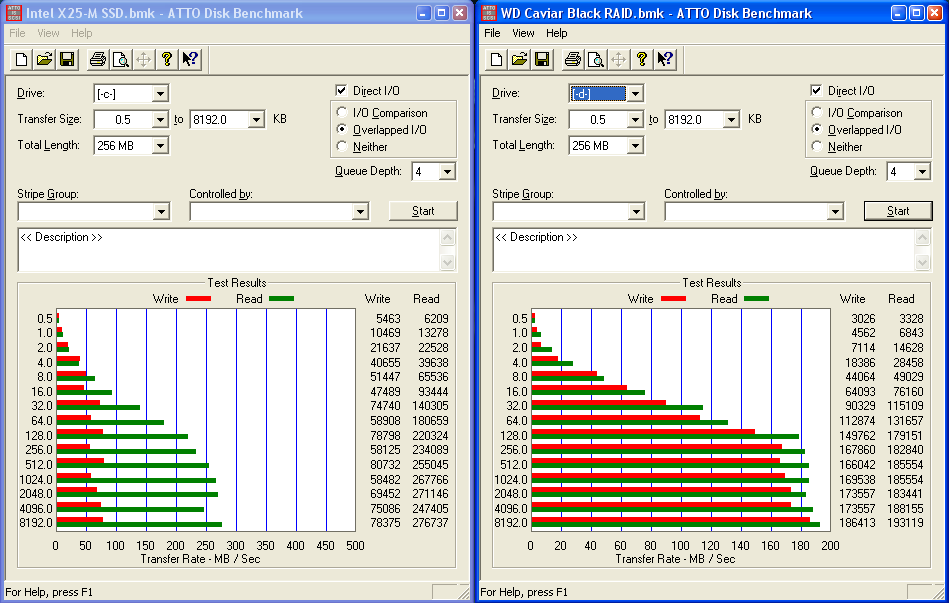
The benchmark cap below compares the performance of the Intel X25-M SSD (left-hand side) to a pair of WD Caviar Blacks in a RAID 0 configuration (right-hand side), on an Intel ICH10R SATAII Controller. Both are partition aligned, the SSD to its Erase Block size [http://thunk.org/tytso/blog/2009/02/20/aligning-filesystems-to-an-ssds-erase-block-size] and the RAID volume to its Stripe Unit [http://support.microsoft.com/kb/929491] boundary, both have 4KB file unit allocation sizes.
(Its a rather large image I know, but its only 35KB in size, so unless you have a dailup from the bronze age it shouldn't take too long to load.)
As can be seen on the left hand side of the image; the SSD typically has faster read rates than the RAID Volume. And at lower filesizes (< 2KB), read and write rates almost double that of the RAID volume. This is what gives that snappy feel to the desktop if you have your OS installed on the SSD. Applications start up almost instantly, files are loaded quickly and everything generally feels faster.
I also have to add that the SSD itself is completely silent, and doesn't generate any significant heat. Plus it's so light I velcroed mine to the inside of my PC case.
On the other hand, I was pleasantly surprised to see a pair of 50 euro drives reach almost 200MB/s and, at higher filesizes, have much better write rates than the 600 euro SSD (~300 euro if you buy the 80GB version). We'll see what happens once the RAID Volume starts filling up, but it's pretty amazing that the controller manages to achieve write rates 100MB/s faster than what the disk achieves when in a single SATA configuration [http://www.tomshardware.com/reviews/hitachi-western-digital-terabyte,2017-6.html].
So what does all this mean? Well, it tells me that SSD's are nice to have, especially if you use them in notebooks, they are light, generate no heat and do random IO really well, but they are still abhorrently expensive when you compare them to the price per GB of traditional HDD's. And if you are in the market for a new HDD, I'd say it's better to buy a pair of smaller drives and RAID 0 them, than to buy a single larger drive (which usually sells for just slightly less than the pair) and use it in a single configuration.
And that's pretty much what I have to tell. If anybody's interested I could go into the details of RAID Volume creation and partition alignment, I decided to forego those details in the interest of not-letting-this-post-turn-into-a-technical-manual-and-cause-people's-eyes-to-glaze-over.
I should probably mention that if you are running Win7 or Vista then you don't need to worry about silly aligned partitions, the partition maker that comes with Vista and Win7 automatically aligns your partitions.
(Now, I know this isn't really a hardware forum, but my reasoning is that any PC gamer looking to decrease his game loading times could benefit from this information. So if you are looking to purchase a new HDD or an SSD in the near future, then please, read on, and follow the links.)
A few months ago, I decided to auction off my firstborn and purchase for myself the rather spiffy looking Intel X25-M 160GB SSD [http://www.intel.com/design/flash/nand/mainstream/index.htm]. You see, I am a hardware addict. It's hard for me to admit that, but I am, so there you go. I waste my life savings on new hardware and my wife frequently compares herself to my PC, I tell her she's being ridiculous of course, nothing on earth could ever compete with the awe inspiring awesomeness of booting up a new system for the first time... the flickering lights, the whir of the fanblades, the graphics card furiously pumping out hot air from its exhaust, and that sweet sound that is the bane of so many hardware lovers sometimes: the "Normal POST" BIOS beep. I tell you, its all very exhilarating.
So, after learning a bit about SSD's [http://www.anandtech.com/storage/showdoc.aspx?i=3531], learning new hoodoo terms like TRIM [http://en.wikipedia.org/wiki/TRIM_%28SSD_command%29] and Secure Erase [http://cmrr.ucsd.edu/people/Hughes/SecureErase.shtml], figuring out how to align filesystems [http://www.ocztechnologyforum.com/forum/showthread.php?t=48309] and of course, upgrading the firmware on my SSD [http://www.pcper.com/article.php?aid=691], I could sit back and experience the joy of 25 second XP bootup times and 15 second bootup times on Vista.
The drawback with SSD's, though, besides the price, is the limited disk size. There's only so much you can do with 160GB, especially when most games these days easily exceed the 10GB mark. To that end I decided to install a traditional HDD to use for gaming, keeping my OS and oft-used applications such as Visual Studio, Photoshop and OpenOffice on the SSD.
I chose the WD Caviar Black [http://www.wdc.com/en/products/products.asp?driveid=552], it's Western Digital's desktop performance drive and has generally garnered good reviews. Furthermore, given how ludicrously cheap HDD's are these days, I purchased two 500GB drives (at 50 euro each) instead of a single 1TB drive and put them in a RAID 0 configuration. And this really, is the core of my little post, the comparison between the performance of the 600 euro 160GB SSD to the 100 euro 1TB HDD RAID volume.
The benchmark cap below compares the performance of the Intel X25-M SSD (left-hand side) to a pair of WD Caviar Blacks in a RAID 0 configuration (right-hand side), on an Intel ICH10R SATAII Controller. Both are partition aligned, the SSD to its Erase Block size [http://thunk.org/tytso/blog/2009/02/20/aligning-filesystems-to-an-ssds-erase-block-size] and the RAID volume to its Stripe Unit [http://support.microsoft.com/kb/929491] boundary, both have 4KB file unit allocation sizes.
(Its a rather large image I know, but its only 35KB in size, so unless you have a dailup from the bronze age it shouldn't take too long to load.)
As can be seen on the left hand side of the image; the SSD typically has faster read rates than the RAID Volume. And at lower filesizes (< 2KB), read and write rates almost double that of the RAID volume. This is what gives that snappy feel to the desktop if you have your OS installed on the SSD. Applications start up almost instantly, files are loaded quickly and everything generally feels faster.
I also have to add that the SSD itself is completely silent, and doesn't generate any significant heat. Plus it's so light I velcroed mine to the inside of my PC case.
On the other hand, I was pleasantly surprised to see a pair of 50 euro drives reach almost 200MB/s and, at higher filesizes, have much better write rates than the 600 euro SSD (~300 euro if you buy the 80GB version). We'll see what happens once the RAID Volume starts filling up, but it's pretty amazing that the controller manages to achieve write rates 100MB/s faster than what the disk achieves when in a single SATA configuration [http://www.tomshardware.com/reviews/hitachi-western-digital-terabyte,2017-6.html].
So what does all this mean? Well, it tells me that SSD's are nice to have, especially if you use them in notebooks, they are light, generate no heat and do random IO really well, but they are still abhorrently expensive when you compare them to the price per GB of traditional HDD's. And if you are in the market for a new HDD, I'd say it's better to buy a pair of smaller drives and RAID 0 them, than to buy a single larger drive (which usually sells for just slightly less than the pair) and use it in a single configuration.
And that's pretty much what I have to tell. If anybody's interested I could go into the details of RAID Volume creation and partition alignment, I decided to forego those details in the interest of not-letting-this-post-turn-into-a-technical-manual-and-cause-people's-eyes-to-glaze-over.
I should probably mention that if you are running Win7 or Vista then you don't need to worry about silly aligned partitions, the partition maker that comes with Vista and Win7 automatically aligns your partitions.