I hate it. My 60 year old father and his wife, however, love it. "It's just like our phones!"
You win this round, Microsoft.
You win this round, Microsoft.



Because, as has been noted a billion times by now, it's absolutely critical for Windows 8's target market.McKitten said:Why is "it boots faster" always mentioned as if it was a big fucking deal?
Even if Win8 boots twice as fast as Win7 (for which you'd have to have a horribly bloated Win7) that saves what, 30 seconds once a day? Who cares? And if you switch your machine on and off so many times that it matters, for fucks sake, don't shut it down, put it into sleep mode. Bam, wake up takes 10 seconds now, problem solved.


It's even easier than that to access Control Panel, just use the keyboard shortcut windows key+i and it brings up the settings menu. This shortcut makes it easier/quicker to access shut down and other power options as well.devotedsniper said:Snip


I didn't use it much, but from what I used; it was okay.MorganL4 said:So you are a fan of Vista?Souplex said:I haven't liked a Microsoft OS since Bill stopped running the place. (Screw you 7!)
I hate Apple, and I'm afraid to use Linux for fear of messing something up irreparably, so I guess I'm stuck waiting for the Google OS to come out and reach mainstream saturation.



Yup.itsthesheppy said:I hate it. My 60 year old father and his wife, however, love it. "It's just like our phones!"
You win this round, Microsoft.


Souplex said:I didn't use it much, but from what I used; it was okay.MorganL4 said:So you are a fan of Vista?Souplex said:I haven't liked a Microsoft OS since Bill stopped running the place. (Screw you 7!)
I hate Apple, and I'm afraid to use Linux for fear of messing something up irreparably, so I guess I'm stuck waiting for the Google OS to come out and reach mainstream saturation.
I feel like it was kind of the target of a massive smear campaign.
You didn't see much advertising for it when it came out, but you saw so much negative advertising from the other side.
When 7 came out there was oh so much advertising for it, because they learned that lesson from Vista. Unfortunately they forgot how to make a usable OS.
If you assume the target market is "idiots", sure. Wouldn't surprise me, the developers sure as hell are idiots.Kinitawowi said:Because, as has been noted a billion times by now, it's absolutely critical for Windows 8's target market.
I already mentioned the simple solution to that: put the machine in sleep mode instead of switching it off. Waking a Win7 machine up from sleep is going to take ten seconds tops. Your phone isn't doing anything different anyway, and neither is Win8. If you want to see how long your phone takes for an actual boot cycle, take out the battery, put it back in, and then time how long it takes to get online now. Win8 may shave around 30 second of the time required to boot, but most people only boot once a day anyway. Hell, in many companies, the machines aren't even switched off in the evening, users just log off, and the machine goes into sleep mode on it's own after a while.Not so much of an issue on laptops, of course, but I will scream and scream and beat people over the head with this until it finally breaks into their skulls - Windows 8 is not designed for laptops or desktops, it's for tablets. Some Microsoft nobjockey asked around to find out why people are using their tablets for internetting instead of their old XP laptops that they're refusing to move on from, and the answer was response time. I can grab my phone out of my pocket, type in my unlock code, punch something onto the Google search bar on the home page and be online in about fifteen seconds. Or I can turn on a desktop, wait for a minute while it starts up, another minute while it sits there and thinks about it, and by the time I've got where I'm going I've forgotten what I ever wanted to look for.
No you don't need boot speed on a tablet. Tablets, just like phones, are rarely ever switched off, only put into hibernate or sleep mode. Comparing boot times of Win7 and Win8 has absolutely nothing to do with that. Of course, it's what M$ does because "halved boot times" sounds a hell of lot better than "wake-up cycle is 1 second faster!"Slight exaggerations, of course, but the point is that speed of startup is exactly what you need - on a tablet. And Windows 8 is aimed at the tablet market first with everything else as an afterthought - it has sacrificed power user demands of customisation and efficiency for low end goals of simplistics and speed.
I'd say the main problem with Vista was that it was a horrible bloated resource-hogging mess on release. Calling Vista the beta version of 7 is somewhat lacking because really, release Vista was the beta version of post-SP Vista. (Sort of like XP, people don't remember much now, but release XP was godawful, but turned out very well with SP2 and later updates) There's a good reason why most companies wait for a couple of service packs before switching to a new Windows version...MorganL4 said:Huh, because I had Vista, and upgraded to 7 the week it came out, and other than having some issues when SP1 was released, it has worked just fine for me. As far as Vista's marketing goes, I remember seeing Bill Gates going all over the place trying to promote the thing. Vista's main problem was that it was the initial switch over to 64bit for most people, which meant that a lot of the hardware they had did not work.

MorganL4 is acutally right, to some extent.McKitten said:I'd say the main problem with Vista was that it was a horrible bloated resource-hogging mess on release. Calling Vista the beta version of 7 is somewhat lacking because really, release Vista was the beta version of post-SP Vista. (Sort of like XP, people don't remember much now, but release XP was godawful, but turned out very well with SP2 and later updates) There's a good reason why most companies wait for a couple of service packs before switching to a new Windows version...

This is such utter bullshit. Just because people are disagreeing with you doesn't mean their opinions aren't genuine. It has nothing to do with aping Notch. People are complaining about the same basic problems because these are actual real problems that people are having! You have a different opinion? Great! Good for you. You can even pretend like yours is more valid or educated or whatever. Go right ahead! But don't for a moment assume that these people's problems and observations are any less real than yours.devotedsniper said:It's amazing how many people hate it because of what certain people have said to the public (e.g. notch) or the old so called trend of every 2nd release is good.
...snip...
The only reason it seems like Windows 8 is hated is because of the loud mouthed crowd (but that's the same with anything, the loudest are always heard)
His delivery could use some work and it's ridiculous that someone with his "expertise" couldn't figure out how to close the weather application, but I agree with 99% of the points he is making. I guess we have similar backgrounds in usability theory or something, and it's absolutely true that Microsoft completely screwed up on these issues.devotedsniper said:Have you actually used Windows 8? I watched that video and couldn't help but think what the hell is this guy on about? I swear he's on crack.Cowabungaa said:Not really. It might be a performance upgrade but with an OS that's, especially for the vast majority of users, an almost negligible thing. What matters more is usability and in that regard Windows 8 is an utter failure. This review words the usability issues pretty well, though it probably exaggerates certain things:devotedsniper said:The only reason it seems like Windows 8 is hated is because of the loud mouthed crowd (but that's the same with anything, the loudest are always heard)
I have. In fact, it was the exact same thing. You won't run into this if you use an actual mouse and not a touchpad, but if you do and your mouse movement starts too close to the edge, it's considered a swipe and it will bring up an App if one is open. If you're not expecting this (and why would you? Windows doesn't indicate it in any way) you go through a bit of a discovery process to find out what has happened. I don't really think it's plausible to expect this to only take 10 minutes. It might be possible if you don't have anything better to do and tried to get back to your task ASAP, but still you run into the problem that you don't really know what caused it, so it's kind of hard to reproduce in the beginning.devotedsniper said:The only thing I've agreed on is the full screen app annoyance but I don't even use the app store so that doesn't even bother me. 8 does not do things automatically, I haven't experienced anything randomly popping up.
I think the issue you're referring to here has to do with conveyance, not continuity (although there is also a continuity problem with the settings). The point is not that there are no ways to open the control panel. The point is that there is no obvious way. I guarantee you that most people will not have known about the little arrow next to the path in Explorer's address bar. Perhaps you've always extensively used it, so it comes natural to you, but this won't be the case for most people. For me it wasn't that hard to find either because it's also still in the left sidebar's navigation tree (below the fold in your screenshot), but again, I doubt most people knew that. There are many other ways of accessing the control panel, but I bet most people used the shortcut on the start menu or on the desktop, and those are gone.devotedsniper said:And as for "I couldn't find the control panel" and other continuity complaints, if he spent more than 10mins not running around like an idiot he could have found several easy ways to do things, for example;
My first screenshot (2 spliced together) show ways on how to get to control panel, you can use a tradition method (left) or you can use there new menu bar by hovering on the top right side of the screen and then clicking settings on it (right);
[http://s285.photobucket.com/user/DevotedSniper/media/metro_zps39c17c0d.png.html]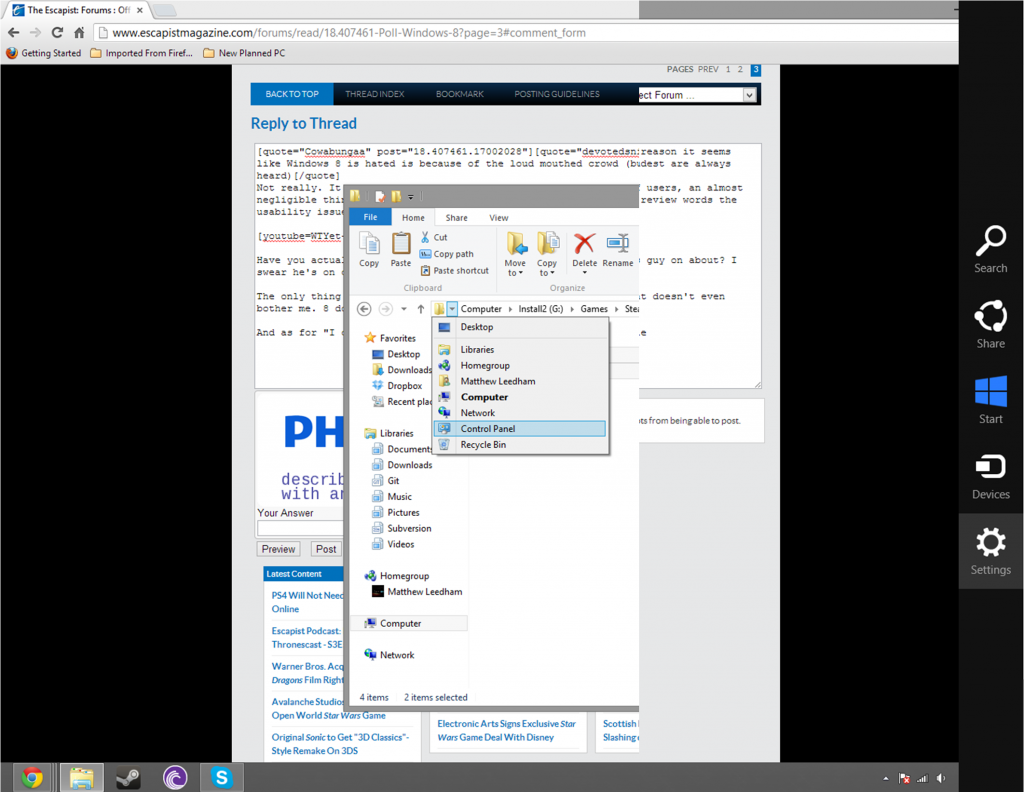
First of all, having to spend 10+ minutes on figuring something out is the very definition of bad user interface design. And how exactly do you expect people to figure this out? If you say "check the internet", that's basically admitting defeat from a UI perspective. It seems that the only alternative is to just randomly move the mouse around until this menu will pop up out of nowhere. Some people may just go into a crazed panic and do just that (fun fact: if I try to frantically move the mouse around, I don't actually hit the corners), while some may be more inclined to take a good look at the screen and try to analytically figure out what the best course of action is (which will lead them nowhere because the menu is fucking invisible).devotedsniper said:And just another thing, he says there isn't an easy way to close apps, again 10+ mins and he would have found something such as going over the left side of the screen and hovering;
[http://s285.photobucket.com/user/DevotedSniper/media/Metro2_zps46ddb581.png.html]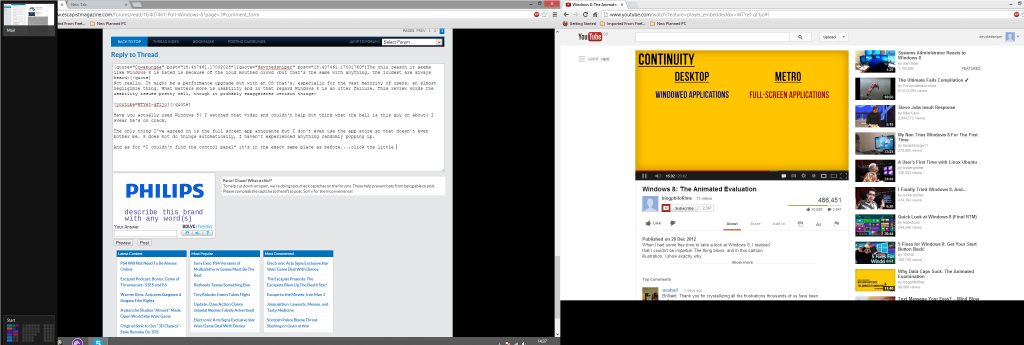
These new menu's aren't even slow, you go over to the side and maybe less than a second the menu pops up there not hard to miss, they even pop up briefly if you mouse over even for a second. All you have to do once its up is right click and it gives you the option to close them
Computational resources aren't the only issue. I'm going to guess that only about 10 applications fit into that side-bar on my HD screen. Also, when I press Alt+Tab, I don't want that overview to be clogged up by 10 apps I'm not using. At some point, switching between them may become more of an issue. And I think you hit that point long before 50 apps are open. Your question "lets be honest who would have so many open at the same time" is actually quite funny, because the answer is "someone who uses Windows 8", because they discourage closing apps. Maybe you don't use many in one day, but what if you use hibernate and rarely restart? Then it's multiple days...devotedsniper said:, but unless you have a good 50+ apps open they don't slow a computer down (unless seriously underpowered) but lets be honest who would have so many open at the same time (consider how many different programs you run a day, bet its less than 50).
I'm not sure he was biased. I think he may sound that way because he obviously made up his mind before he made the video, but it's hard to say about his attitude before actually trying out the OS. What I can tell you is that I went in with an open mind and that my experience was very similar. I was fucking excited about trying out the new Windows. And when I didn't initially like it, I didn't immediately install a third-party start menu and exclusively used desktop mode, because I figured it might take some time to get used to this and I wanted to learn the "way of the future" basically. I figured that there was probably some rhyme and reason to these UI changes. Now I think it was solely to integrate the mobile and desktop OS development lines and the UI was sacrificed.devotedsniper said:In the end he spent 30 minutes before he was screaming he couldn't take no more, 30 minutes is not enough to get completely used to an operating system (a new style of one), I'm also not sure it's just me but he comes off as really biased, he didn't go in with an open mind. I don't know maybe it's because I'm a computing professional but so far I've found the thing extremely easy to use, it works well and while he makes a couple of good points, I completely disagree with most of the things he said. My main annoyance which would annoy him (something he doesn't mention) is the fact the power button is in the settings... not sure what they were thinking there but still once you know where it is it's just as quick to go there as it is in xp/7.
Do you honestly believe that it will take the average user only two hours to get used to Windows 8? So then why are this many people still complaining? Do you think most of them haven't actually used Windows 8 for more than two hours and are just making up stories? Then you are just as bad as the person I quoted above.devotedsniper said:I am in no way a fan boy of 8, but I don't think bashing a OS for trying something new is right. If you spend an hour maybe two getting used to it you would find it actually works well, metro works well with a desktop, instead of swiping you just use the mouse wheel, it works well. Hell you don't even have to use Metro for the majority of use, once you open a regular program (none app) your back on the desktop.
If you say your sister can only browse the web and she can now do that as well in Win8 as in other Windows versions, you realize it really just means she can click one button to open the browser, right? I don't really find that a huge testimony to the usability of the OS. But even if she can do more: people are different in how they deal with having to learn new stuff and some of the frustration that comes with it. People have different attituted towards computers to begin with. Some really just want to accomplish the task at hand and don't appreciate a new OS delaying that. Small children learn faster and may not yet have the bagage/intuition of years of earlier Windows. Even if your sister could learn to expertly use Windows 8 in an hour, the fact that these topics exist should tell you that clearly this isn't the average experience.devotedsniper said:I also put 8 on my sisters 6 year old laptop (which is slow, single core, 1gb ram, need i go on?) and it runs great, what's more surprising is that after a 2 days of light use my sister (who cannot use a computer for anything other than web browsing to save her life) was using 8 as if it was XP/Vista/7, so it is user friendly even for those who aren't computer experts. One final thing there is still a start button, granted it takes you to metro but again if it really bothers you you can fix that.