I've been really interested in the idea of recording myself playing through some of the games I've been getting into and I've been really curious to try my hand at this whole, 'internet reviewer' thing. I've done the odd text review once every few months but I'd really like to expand my horizons and try making an actual review video.
That being said though, getting into that seems daunting to say the least. I'm looking for a way to record footage from my PS3 and Wii U. It seems like this would be easy enough but as I'm looking at different devices, it seems like some can't recognize gameplay from the Wii U or its Wii mode. There's also the issue of editing which I think would be pretty cut-and-dry but I'm not sure what exactly my computer needs to be able to handle to properly edit a video. As far as I can tell, what I really need are a capture card, a microphone, an external hard drive and a computer capable of editing down hours worth of footage.
I guess my main areas of confusion come from which capture devices I can use with the Wii U (and the Wii mode of the U) and PS3. I've also noticed some that claim I don't need a PC to use along with the device itself. If anybody can offer any advice I'd be really appreciative.
I've gone through a few capture cards and still do LPs on a regular basis, so perhaps I could help. :3
First question, do you want to capture footage in 60 fps? That will limit the pool a lot.
When I first started doing LPs, I got myself a Dazzle DVC 100 capture card and Pinnacle Studios software. I will say right now, avoid this card. In the past, a Dazzle was decent, but the company was bought up by Avid and the cards just plummeted in quality. Not to mention they can only record in 480i. If you wish to play on your television, then you must have cable splitters, which diminishes the quality of the video in general.
Requirements for Use:
Laptop or desktop PC with 3.0 GHz single core or 2.0 GHz multi-core processor
Microsoft® Windows® 8, 7 or Vista (32 or 64-bit), or Windows XP Service Pack 3
HD PVR 2 GE Plus includes HDPVRCapture.com application which runs on Mac OSX 10.7 / 10.8 ( Intel 32/64bit only, no PPC support)
TV set with HDMI input
1 GB memory recommended
Graphics card with 256 MB memory
Sound card
220 MB free hard disk space
CD-ROM drive (for software installation)
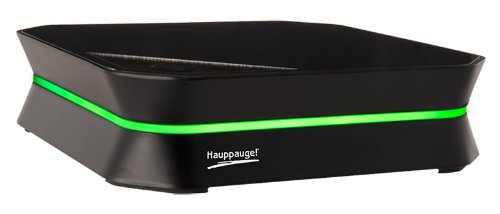
After that, I invested in the HD PVR 2, if only because I had always heard that the Hauppauge HD PVR was a good product and the new one was better. The plus sides of the HD PVR 2 are that you can record component inputs, and HDMI in both 30 FPS and 60 FPS, and in 1080p. Downsides though outweighed the good after about a year and a half of use. The HD PVR 2 auto-detects what your TV settings are, and changing them can be a pain. While the model can record 60 FPS, it can't do it in 1080p and can only record 60 FPS at 720p (which is fine in your case). The other problem though is that any use of an upscaler or HDMI converter locks out control over Brightness and Contrast settings, something I found out to my chagrin. There is also a composite adapter for the HD PVR 2 that is sold seperately to allow you to record older composite or S-Video consoles. Plain and simple, this adapter is pure shit. It had a hard time with the Nintendo GameCube, causing a noticeable green line offset in recordings. It also would not work with an N64 or below. My component adapter that came with the unit was dying, and I finally decided that I'd upgrade to the current capture unit I'm using.
The software that is bundled with the HD PVR 2 is ArcSoft ShowBiz. It will auto detect all video devices on the system. Problem, it's very damn finiky at times and loves to choose it detects the HD PVR 2 and when it doesn't. To remedy this, it is recommended to use the free software, Hauppauge Capture, as it offers the same functionality in terms of recording as ArcSoft ShowBiz. In terms of user-friendliness, ArcSoft ShowBiz is not that. Many of the options are grayed out due to the software auto-detecting and leaves little room for self recordings bar what Bit Rate to record at. Hauppauge Capture is a little bit easier with user friendliness, but due to the auto-detection some problems still persist. One positive side is that the HD PVR 2's files are instantly encoded onto your computer as you are recording, but it comes at the cost of needing an AC adapter to plug into the wall.
System Requirements for use:
Mac:
- OS X 10.7, 10.8 or later
- 2.0 Ghz (or higher) Intel Core 2 Duo CPU, or 2.0 Ghz (or higher) multi-core i3, i5 or i7 CPU
- 4GB Total Installed RAM (or higher)
- Built-in USB 2.0 port
Windows:
- Windows 7, Windows 8 or later
- 2.0 Ghz (or higher) dual core CPU, or 2.0 Ghz (or higher) multi-core i3, i5 or i7 CPU
- Sound card (if your laptop can play sound, then it meets this requirement)
- 4GB Total Installed RAM (or higher)
- Built-in USB 2.0 port
And so enters, The Elgato Game Capture HD, or as I like to call it "the best damned capture unit I've ever used." The Elgato functions similar to the HD PVR 2, it can capture in 1080p but only at 30 FPS and at 720p at 60 FPS. The unit comes with a special Playstation Cable as well as a component adapter for other component connections. It is able to capture via HDMI as well. The Playstation Cable records in a Component signal, but can also be used on the Playstation 2, Playstation 1, and Playstation 3. Like the HD PVR 2, the system comes with a composite adapter that can be purchased separately. Unlike the HD PVR 2 though, the cable works perfectly with any composite or S-Video connection, bar some fiddling in some cases. I've been able to record all the way down to the NES with the unit, and apparently testers have been able to record even the Atari 2600 with it. Another great thing is that if you want to use 3rd party HDMI converters, you are not locked out of any brightness or color controls at all.
In terms of the software, unlike other units the Game Capture HD software is entirely free and available on Elgato's site. It's very user friendly, but there is a bit to learn about when fiddling with it. The software lists all compatible consoles and systems that can be recorded with, and has options for those not listed at "Other." The software limits the maximum bit rate that can be recorded at, which is good because recording certain systems or games start to lock up if being recorded at too high of a frame rate. You have options to record at HDMI, Component, or Composite and the system will auto detect which one on other occasions. The software also comes with an option to livestream, but I highly recommend using other software for that such as Open Broadcaster. A bad thing about the software is that playback recording is active when first starting up, which just wastes space. Luckily this option can be turned off.
Now the Elgato recently got another variant, the Elgato Game Capture HD60. This unit is capable of recording at 1080p at 60 FPS, but it sacrifices component and composite inputs and limits it to HDMI only. This new unit is made more for the latest generation of consoles, and PC. I recommend the previous model listed above since it gives you the option to expand to more systems.
In terms for editors, Adobe Premier was the go-to option in the past, and still is one of the best editing softwares out there by far. Problem nowadays though is that it is on a subscription based system only like how Photoshop went. Sony Vegas is an excellent editor as well, but it's prices are ridiculous in general. So instead, I recommend Sony Movie Studio Platinum 12 Suite. While no longer supported officially, the editor has every basic function of the regular Sony Vegas, and plug-ins for Chroma Key and green screening. It can render in multiple video and audio formats, and has the ability to add multiple tracks for video and audio.
For microphones that's a bit harder, as the aucustics of your room could make a good mic sound either amazing or downright terrible. Personally, the cheapest actually microphone that would give you the best quality would be either a Blue Yeti, or the newer Blue Spark. For me, I have a Blue Yeti I use more for group stuff since I've not found a good location to get good acoustics. All other times I'm using a Logitech G230 Headset and use a USB Adapter for audio recording. For recording software for audio, I use Audacity since it's free.
tl:dr
Elgato Game Capture HD is the best choice for capture card, with Sony Movie Studio Platinum 12 being good for editing. Feel free to PM me if you have any more questions. :3
This site uses cookies to help personalise content, tailor your experience and to keep you logged in if you register.
By continuing to use this site, you are consenting to our use of cookies.