Why, after years of complaining, am I only hearing of this now? Shouldn't this be the standard advice to people who have problems, rather than "Well, sucks to be you. Steam is awesome and you are lame because you have no Internet. I don't have this problem, but don't you dare complain about steam". (not this thread in particular, but as said I've had this problem before and that was all i got)Vigormortis said:I use Steam's offline mode quite often. Both by choice and because my internet, while (at times) fast, can be very unreliable. Thanks Comcast!
But anyway, besides a few times wherein I screwed up or there was some bug present because I was using the latest beta build of Steam, I've never really had issue with Offline Mode. At least, not within the past few years.
It's not hard. If you know you'll be wanting to play a game, just make sure it's up-to-date with the Steam Client version. Easily achieved by just running the game once while Steam is online. Then, the next time (and frankly, every time) you shutdown Steam, make sure it actually closes out and syncs with your account BEFORE you shutdown your computer or unplug from your network/internet connection.
Then, the next time you open Steam without a viable internet connection, it will (with few exceptions) open into offline mode. At which point, any games that were up-to-date and synched with your client version will open and run like usual. Sans online features, of course.
Is it a perfect system? Hell no. Not even close. It needs a LOT of work. But the amount of trouble I hear some people have with it tells me that, more often than not, these people don't fully understand how Offline Mode works.
As a side note: The idea that you have to go online to set yourself to offline mode is ridiculous. Does that method work? Sure. Sometimes. But it's the needlessly convoluted way of doing it.

Seriously Steam...
- Thread starter Zebidizy
- Start date
Recommended Videos

Because Impulse actually uses a rather inefficient method of updating most of the time. It doesn't directly update your game files. It, more often than not, downloads an update patcher that, once download, then has to run to update your games. This can lead to glitchy update installs and will often leave files on your harddrive that need not be there.Ledan said:EDIT: oh! Forgot to mention that I hate that I can't play my games when they are updating. I can on impulse/gamestop online, so why not steam? It breaks a game when you have slow internet connection (say like in Kenya), and haven't turned of automatic updates (because you are new to steam and there is no tutorial or something to warn you), and then you can't play your game at all. If you turn off the update, well then the game has an unfinished download so bollocks to you.
Steams updater directly patches your game files while the update is downloading. This way there's fewer steps and fewer chances of something going wrong in the process. It's also a much faster method of patching. I've seen Sins of a Solar Empire patch at least three times faster on Steam than it ever did on Impulse. And believe me, I've owned the game on both platforms.
This is why you can't play a game while it's updating. You're basically expecting to be able to run your game files while they're being patched. That's just not doable.
I will say, though, that even Impulses updater is better than Blizzards. Dear God is their updater a pile of ****. If you do a fresh install of, say, Starcraft 2, when you go to update, it will download every update and patch released since launch....ONE AT A TIME. And, it won't move onto the next patch until it's finished installing the last one it downloaded.
It's ridiculously stupid.
Sorry? I've been saying this for years, actually.Ledan said:Why, after years of complaining, am I only hearing of this now? Shouldn't this be the standard advice to people who have problems, rather than "Well, sucks to be you. Steam is awesome and you are lame because you have no Internet. I don't have this problem, but don't you dare complain about steam". (not this thread in particular, but as said I've had this problem before and that was all i got)Vigormortis said:I use Steam's offline mode quite often. Both by choice and because my internet, while (at times) fast, can be very unreliable. Thanks Comcast!
But anyway, besides a few times wherein I screwed up or there was some bug present because I was using the latest beta build of Steam, I've never really had issue with Offline Mode. At least, not within the past few years.
It's not hard. If you know you'll be wanting to play a game, just make sure it's up-to-date with the Steam Client version. Easily achieved by just running the game once while Steam is online. Then, the next time (and frankly, every time) you shutdown Steam, make sure it actually closes out and syncs with your account BEFORE you shutdown your computer or unplug from your network/internet connection.
Then, the next time you open Steam without a viable internet connection, it will (with few exceptions) open into offline mode. At which point, any games that were up-to-date and synched with your client version will open and run like usual. Sans online features, of course.
Is it a perfect system? Hell no. Not even close. It needs a LOT of work. But the amount of trouble I hear some people have with it tells me that, more often than not, these people don't fully understand how Offline Mode works.
As a side note: The idea that you have to go online to set yourself to offline mode is ridiculous. Does that method work? Sure. Sometimes. But it's the needlessly convoluted way of doing it.
I guess I've just never seen your particular complaint. Either way, hope this helps.

If, however, it doesn't, feel free to contact me. I can usually help people with their Steam woes.
Not all, mind you. Some issues are simply systemic. (like the God damned friends network always going down lately) But, for everything else I can usually lend a hand.

Why do you people not simply launch the .exe file in the steamapps folder of your game? It works for most games, to my knowledge.
Also, if you want to play games offline, then maybe you shouldn't buy them on a digital platform.
Also, if you want to play games offline, then maybe you shouldn't buy them on a digital platform.

Yeah. Anyone who goes on, say, a cabin trip and wants to play Steam games on their laptop during the trip should obviously turn on Offline Mode when they're at home, then bring the laptop with them and not turn the laptop off for the next week. I mean, that's entirely reasonable, right?Daveman said:It's not that bad a system. It's only preventing you from playing if the internet is going to be down when you don't know about it. That's one scenario. In your case steam isn't stopping you, it's just 1) you didn't prepare for the internet to be down by switching to offline mode beforehand and 2) you have to move your computer to connect it to the internet temporarily.
If you're so used to playing offline one wonders why you were online at all. Was it perchance to take advantage of the steam sales?

GoG for one is not a direct competitor. Why? It does not offer a comparable product or even a comprable service. It sells reprogrammed classic games with a sprinkling of AAA games.Owyn_Merrilin said:Impulse, Gamer's Gate, GoG, Desura, and Capsule are all direct competitors to Steam, and they all have one thing in common: No platform specific DRM. In fact, Steam and Origin are the only two DD stores that have heavy DRM. DRM is unnecessary. It only punishes paying customers, never pirates. Heavy handed DRM is even worse.
As for the bug: the functionality you're describing is the bug. The workaround I found gets it to work in the situations you're saying it shouldn't.
Desura I have never even heard of but I downlaoded it and made an account(just for you) it has 23 "AAA" games, only a tiny handful of which of which I have even heard of and the rest appear to be Indie games. So to call that competition is laughable.
Lets see Capsule..Oh a cool feature to trade in games? Oh...all the larger games cant be traded in, and the trade in price is about 1/5 of the purchase price, around 1-2 dollars per game.
Gamers Gate? Just another online store of which there are hundreds.
Impulse? Now its just the Gamestop app, essentially a mini version of Steam.
The problem with all of these bar GoG(which is different to all of these anyway) Im sure they are perfectly fine services but what possible incentive is there for me to choose them over Steam? This is the same problem with Origin, and it is the same problem with any digital distribution service that can exist that isn't Steam, why should I choose it over the most established service on the market.
Steam quite simply has the most games, the best prices and better features. In contrast to the DRM, a HUGE majority will favor the benefits over the DRM because quite simply, that kind of DRM is becoming basically irrelevant now, and soon enough it is going to become common place.
And how is offline mode working offline..a bug? That is what it is designed to do...
I still find it slightly laughable that you call DRM as taxing as checking my email "heavy handed". Always on is heavy handed, because it cannot be expected that you will have internet ALL the time. Requiring you to have it for a mere 30 seconds to set up playing games for 2 months, is not in any way hard to do.

Just buy a 25 meter long Ethernet cable and do some handywork while mounting the cables up around walls and corners. It was the first thing I did before moving in to my new apartment, buying a proper router with good WI-FI, and buying an ethernet cable long enough that I wouldn't personally have to use that WI-FI.

I see this problem come up with people from time to time but I have no idea why it happens. I've played games offline on Steam anytime I want, and I've never had an issue. I assume because I am logged on most of the time and only play offline when net drops and such?
It has just never been an issue for me. Sadly, stuff like this is always going to be a problem when you involve an outside client. Hopefully it'll be fixed someday.
It has just never been an issue for me. Sadly, stuff like this is always going to be a problem when you involve an outside client. Hopefully it'll be fixed someday.
Why would you go on a cabin trip just to sit inside and play video games the whole time!? Go outside, man!Naeras said:Yeah. Anyone who goes on, say, a cabin trip and wants to play Steam games on their laptop during the trip should obviously turn on Offline Mode when they're at home, then bring the laptop with them and not turn the laptop off for the next week. I mean, that's entirely reasonable, right?Daveman said:It's not that bad a system. It's only preventing you from playing if the internet is going to be down when you don't know about it. That's one scenario. In your case steam isn't stopping you, it's just 1) you didn't prepare for the internet to be down by switching to offline mode beforehand and 2) you have to move your computer to connect it to the internet temporarily.
If you're so used to playing offline one wonders why you were online at all. Was it perchance to take advantage of the steam sales?

Yes, it couldn't be easier, you couldn't have made it easier. But still some people will post in this thread thinking you need to be online to go into offline mode, because they will take 20 minutes to ***** about something they don't understand, instead of doing 2 minutes or research.Mr.Tea said:First of all, just let me say that you're allowed to swear on the internet. If it gets to where you write "feck", then just write "fuck" please. Fuck fuck fuck, fucking motherfucking fuck. There.Zebidizy said:Why isn't offline mode automatically available. What if I had feck all internet and I could never access steam until i returned to uni. Has anyone else suffered this problem and am i crazy or a couple of years ago you never had to do this?
All right, on to Steam: Offline mode is automatically available if you've allowed Steam to store your account information on your computer.
That is, this checkbox must not be checked
(and maybe Steam Guard has something to do with it too, but I've never not had it since it exists so I'm not sure...):
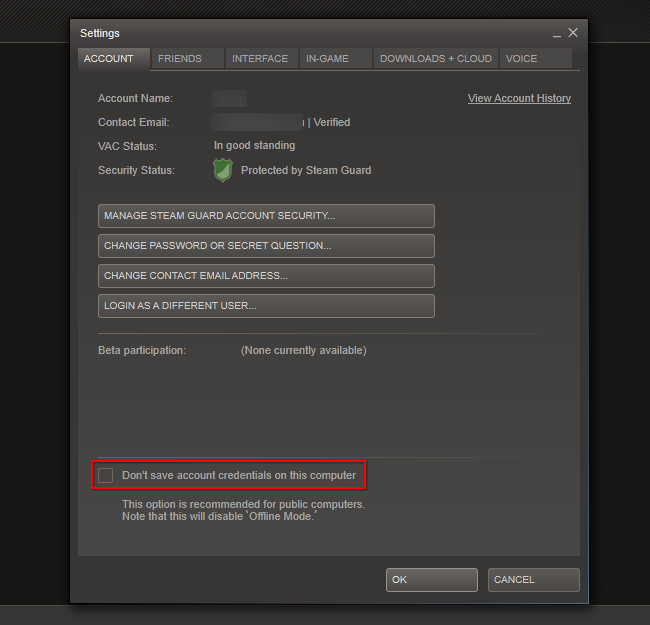
That's it. And it makes sense too.
That's funny, when I hit that button, Steam launches in offline mode...Dr Jones said:You can start offline mode easily if you are online, but if Steam can't connect to the internet you get this:
"Retry Connection" or "Launch in Offline Mode"
Naturally you press "Launch in Offline Mode" if you know your internet is dead. Guess what:
"Your computer has to be online to perform this action".
Just.. What? And when I did get online and try to go offline it says "Your account credentials are not stored on this computer, so you cannot go in offline mode".
What I'm trying to say is that your post is as anecdotal as the one you were criticising.
I'm surprised no-one's mentioned that you can't use the full Offline mode on a shared computer. If you tell Steam to store your credentials and then switch to Offline mode then yeah, you can be offline indefinitely, but those details are stored independently of user profiles on your computer, meaning that anyone you share the computer with who also uses Steam will not be able to log in.
I'd rather not go outside when it's pouring down, so it's nice to be able to play something if the weather turns to shit and we go tired of board games. Or we might want to do some rounds of Worms in the evening for family time(which is GREAT family time, by the wayClive Howlitzer said:Why would you go on a cabin trip just to sit inside and play video games the whole time!? Go outside, man!Naeras said:Yeah. Anyone who goes on, say, a cabin trip and wants to play Steam games on their laptop during the trip should obviously turn on Offline Mode when they're at home, then bring the laptop with them and not turn the laptop off for the next week. I mean, that's entirely reasonable, right?Daveman said:It's not that bad a system. It's only preventing you from playing if the internet is going to be down when you don't know about it. That's one scenario. In your case steam isn't stopping you, it's just 1) you didn't prepare for the internet to be down by switching to offline mode beforehand and 2) you have to move your computer to connect it to the internet temporarily.
If you're so used to playing offline one wonders why you were online at all. Was it perchance to take advantage of the steam sales?
).Except we can't, because there's no offline mode now that we actually need one.

1. Says all OP is doing is "whining" when OP has legit points.Spitfire said:Explain.Dr Jones said:That is entirely an untruth, way to go chastising OP and showing you know nothing of Steam's "offline mode".GenericAmerican said:All I hear is whine, log in once a month, play offline.
Sounds like you need to disable the "Don't store account credentials on this computer" option from Steam's settings.And when I did get online and try to go offline it says "Your account credentials are not stored on this computer, so you cannot go in offline mode". I log off and on, and it gives me the same message.
Ok, I'm confused..By this point I don't even bother with offline mode, I just turn my laptop on, start Steam online, and whenever I have to go somewhere with no internet, I just have Steam open.
2. Might be the case, but makes no sense to me I should disable it, when it is asking me to have it enabled.
3. Fixed it.
Mr.Tea said:Congratulations Steam Offline mode works as it should for you. What does it have to do with my issue? When you press the button, it works, huzzah, when I do it, it doesen't. Makes it a pretty big damn flaw in my opinion.Zebidizy said:That's funny, when I hit that button, Steam launches in offline mode...Dr Jones said:You can start offline mode easily if you are online, but if Steam can't connect to the internet you get this:
"Retry Connection" or "Launch in Offline Mode"
Naturally you press "Launch in Offline Mode" if you know your internet is dead. Guess what:
"Your computer has to be online to perform this action".
Just.. What? And when I did get online and try to go offline it says "Your account credentials are not stored on this computer, so you cannot go in offline mode".
What I'm trying to say is that your post is as anecdotal as the one you were criticising.
The OP only has legitimate points because he is ill-informed on exactly how Offline Mode works. If he'd take the time to learn how it works, or in the very least, learn what he needs to do to make it work, he'd not have those issues at all.Dr Jones said:1. Says all OP is doing is "whining" when OP has legit points.Spitfire said:Explain.Dr Jones said:That is entirely an untruth, way to go chastising OP and showing you know nothing of Steam's "offline mode".GenericAmerican said:All I hear is whine, log in once a month, play offline.
Sounds like you need to disable the "Don't store account credentials on this computer" option from Steam's settings.And when I did get online and try to go offline it says "Your account credentials are not stored on this computer, so you cannot go in offline mode". I log off and on, and it gives me the same message.
Ok, I'm confused..By this point I don't even bother with offline mode, I just turn my laptop on, start Steam online, and whenever I have to go somewhere with no internet, I just have Steam open.
2. Might be the case, but makes no sense to me I should disable it, when it is asking me to have it enabled.
3. Fixed it.
A little bit of knowledge goes a long way.
For example, your only (apparent) issue with getting Offline Mode to start up is the fact that you have Steam NOT store you account credentials locally. Maybe you didn't notice, but in that options menu, just below the check box, it says and I quote,
"This option is recommened for public computers.
Note that this will disable 'Offline Mode'."
Notice the "will disable offline mode" part? That's almost assuredly your...well, in the immortal words of Adam Savage, "Well there's your problem."
So, unless your computer is a "public computer", there's no reason to have that box checked. Just allow Steam to store your account credentials locally, make sure your games are always up-to-date with your current version of the Steam client, and always make sure that when you log off you allow Steam to completely close down and sync your files. You follow those rather simple procedures and I can all but promise you Offline Mode will ALWAYS work.

Vigormortis said:The OP only has legitimate points because he is ill-informed on exactly how Offline Mode works. If he'd take the time to learn how it works, or in the very least, learn what he needs to do to make it work, he'd not have those issues at all.Dr Jones said:1. Says all OP is doing is "whining" when OP has legit points.Spitfire said:Explain.Dr Jones said:That is entirely an untruth, way to go chastising OP and showing you know nothing of Steam's "offline mode".GenericAmerican said:All I hear is whine, log in once a month, play offline.
Sounds like you need to disable the "Don't store account credentials on this computer" option from Steam's settings.And when I did get online and try to go offline it says "Your account credentials are not stored on this computer, so you cannot go in offline mode". I log off and on, and it gives me the same message.
Ok, I'm confused..By this point I don't even bother with offline mode, I just turn my laptop on, start Steam online, and whenever I have to go somewhere with no internet, I just have Steam open.
2. Might be the case, but makes no sense to me I should disable it, when it is asking me to have it enabled.
3. Fixed it.
A little bit of knowledge goes a long way.
For example, your only (apparent) issue with getting Offline Mode to start up is the fact that you have Steam NOT store you account credentials locally. Maybe you didn't notice, but in that options menu, just below the check box, it says and I quote,
"This option is recommened for public computers.
Note that this will disable 'Offline Mode'."
Notice the "will disable offline mode" part? That's almost assuredly your...well, in the immortal words of Adam Savage, "Well there's your problem."
So, unless your computer is a "public computer", there's no reason to have that box checked. Just allow Steam to store your account credentials locally, make sure your games are always up-to-date with your current version of the Steam client, and always make sure that when you log off you allow Steam to completely close down and sync your files. You follow those rather simple procedures and I can all but promise you Offline Mode will ALWAYS work.
It's really annoying when OP doesn't know how to google something, comes to a forum, asks about it, is told about it, and never reads his own thread any way trying to confirm his beliefs that steam is a "the most horrible DRM out there!" yet he could have easily done what you said or had read this guys post
Its disgusting how some escapist users act. Even AFTER this method had been posted all the Steam haters ignored it and started spamming this thread, instead of, you know, doing a simple Google search or actually reading the thread or even *GASP* actually contributing to the topic and answering the question instead of spewing their worthless, duly uneducated opinions.oplinger said:When steam failed to connect online, it used to ask if you'd like to start in offline mode.
Due to reasons, they got rid of it. either because of hacking (using a third party to run through steam to download any game on steam. A real thing.) or account theft/piracy (In offline mode, you can play other accounts games, even if they're logged on.) So now you have to verify it by logging in, then going offline. Which I guess doesn't help a whole lot, but..you know...whatever.
Anyway, you can still start steam in offline mode, it's just a little more advanced now than it was before.
http://forums.steampowered.com/forums/showthread.php?t=2641233
We should stop bothering, you can lead a donkey to water but you can't make him drink it.Plazmatic said:Vigormortis said:The OP only has legitimate points because he is ill-informed on exactly how Offline Mode works. If he'd take the time to learn how it works, or in the very least, learn what he needs to do to make it work, he'd not have those issues at all.Dr Jones said:1. Says all OP is doing is "whining" when OP has legit points.Spitfire said:Explain.Dr Jones said:That is entirely an untruth, way to go chastising OP and showing you know nothing of Steam's "offline mode".GenericAmerican said:All I hear is whine, log in once a month, play offline.
Sounds like you need to disable the "Don't store account credentials on this computer" option from Steam's settings.And when I did get online and try to go offline it says "Your account credentials are not stored on this computer, so you cannot go in offline mode". I log off and on, and it gives me the same message.
Ok, I'm confused..By this point I don't even bother with offline mode, I just turn my laptop on, start Steam online, and whenever I have to go somewhere with no internet, I just have Steam open.
2. Might be the case, but makes no sense to me I should disable it, when it is asking me to have it enabled.
3. Fixed it.
A little bit of knowledge goes a long way.
For example, your only (apparent) issue with getting Offline Mode to start up is the fact that you have Steam NOT store you account credentials locally. Maybe you didn't notice, but in that options menu, just below the check box, it says and I quote,
"This option is recommened for public computers.
Note that this will disable 'Offline Mode'."
Notice the "will disable offline mode" part? That's almost assuredly your...well, in the immortal words of Adam Savage, "Well there's your problem."
So, unless your computer is a "public computer", there's no reason to have that box checked. Just allow Steam to store your account credentials locally, make sure your games are always up-to-date with your current version of the Steam client, and always make sure that when you log off you allow Steam to completely close down and sync your files. You follow those rather simple procedures and I can all but promise you Offline Mode will ALWAYS work.
It's really annoying when OP doesn't know how to google something, comes to a forum, asks about it, is told about it, and never reads his own thread any way trying to confirm his beliefs that steam is a "the most horrible DRM out there!" yet he could have easily done what you said or had read this guys post
Its disgusting how some escapist users act. Even AFTER this method had been posted all the Steam haters ignored it and started spamming this thread, instead of, you know, doing a simple Google search or actually reading the thread or even *GASP* actually contributing to the topic and answering the question instead of spewing their worthless, duly uneducated opinions.oplinger said:When steam failed to connect online, it used to ask if you'd like to start in offline mode.
Due to reasons, they got rid of it. either because of hacking (using a third party to run through steam to download any game on steam. A real thing.) or account theft/piracy (In offline mode, you can play other accounts games, even if they're logged on.) So now you have to verify it by logging in, then going offline. Which I guess doesn't help a whole lot, but..you know...whatever.
Anyway, you can still start steam in offline mode, it's just a little more advanced now than it was before.
http://forums.steampowered.com/forums/showthread.php?t=2641233
I just checked, and that box is unchecked.. I think my problem is with the Steam mobile app, I still have a "Steam Guard" mail floating around to it (when I try to log into it I have to use Steamguard, is there a way to avoid that? Cause it is fucking annoying to have to check my mail and write it in, and it's a pain on a phone). I guess I should just try to write in that Steam Guard code into my phone (I never bothered to do it), as I think that is my problem.Vigormortis said:The OP only has legitimate points because he is ill-informed on exactly how Offline Mode works. If he'd take the time to learn how it works, or in the very least, learn what he needs to do to make it work, he'd not have those issues at all.Dr Jones said:1. Says all OP is doing is "whining" when OP has legit points.Spitfire said:Explain.Dr Jones said:That is entirely an untruth, way to go chastising OP and showing you know nothing of Steam's "offline mode".GenericAmerican said:All I hear is whine, log in once a month, play offline.
Sounds like you need to disable the "Don't store account credentials on this computer" option from Steam's settings.And when I did get online and try to go offline it says "Your account credentials are not stored on this computer, so you cannot go in offline mode". I log off and on, and it gives me the same message.
Ok, I'm confused..By this point I don't even bother with offline mode, I just turn my laptop on, start Steam online, and whenever I have to go somewhere with no internet, I just have Steam open.
2. Might be the case, but makes no sense to me I should disable it, when it is asking me to have it enabled.
3. Fixed it.
A little bit of knowledge goes a long way.
For example, your only (apparent) issue with getting Offline Mode to start up is the fact that you have Steam NOT store you account credentials locally. Maybe you didn't notice, but in that options menu, just below the check box, it says and I quote,
"This option is recommened for public computers.
Note that this will disable 'Offline Mode'."
Notice the "will disable offline mode" part? That's almost assuredly your...well, in the immortal words of Adam Savage, "Well there's your problem."
So, unless your computer is a "public computer", there's no reason to have that box checked. Just allow Steam to store your account credentials locally, make sure your games are always up-to-date with your current version of the Steam client, and always make sure that when you log off you allow Steam to completely close down and sync your files. You follow those rather simple procedures and I can all but promise you Offline Mode will ALWAYS work.
But is is just better and easier not to go into offline mode, and just make sure that your computer is already on Steam when you have no internet. Some games cant play with offline mode.
Steam Guard is a security feature (the likes of which I think MORE companies, especially Blizzard, should start utilizing) that basically links your Steam account with a specific hardware profile. That way, should someone try to log into your account from a different computer, they will be blocked unless they enter your account name, password, and Steam Guard code (which is sent to your e-mail account whenever a new login from a different computer is detected)Dr Jones said:I just checked, and that box is unchecked.. I think my problem is with the Steam mobile app, I still have a "Steam Guard" mail floating around to it (when I try to log into it I have to use Steamguard, is there a way to avoid that? Cause it is fucking annoying to have to check my mail and write it in, and it's a pain on a phone). I guess I should just try to write in that Steam Guard code into my phone (I never bothered to do it), as I think that is my problem.
But is is just better and easier not to go into offline mode, and just make sure that your computer is already on Steam when you have no internet. Some games cant play with offline mode.
Do you regularly log into your Steam account on other machines? If so, then offline mode will only work on your primary computer if it's been offline since your last login on another computer or if you've resynched your account to your primary computer, using a Steam Guard code.
I'm not 100% sure how the mobile app operates, but I'm under the assumption that it doesn't directly synch with your Steam Guard account settings. As in, it doesn't count as a separate system install. I'll have to look into it further.
As for the e-mail from Steam Guard, I'd check it. It's likely an access code.
However, and I'm sure this goes without saying, if you get an e-mail asking you for your Steam account info, even if it's labeled Steam Guard in some way, ignore it.
If the e-mail is a Steam Guard code, just make sure your account is synched to your primary computer; using the code. Then, if you follow the other procedures I listed in my last post, you should no longer have any issues with Offline Mode.
If you need any other help with it, feel free to PM me.
[edit]
You can think of Steam Guard as a authenticator, much like what Blizzard uses for World of Warcraft or Diablo 3.
Except that, in this case, Steam Guard actually works and protects more than just one or two games.
Oh, I have a well-good understanding of Steam and Steamguard, but I appreciate your helpfulnessVigormortis said:snip
When I tried to log in with the app it sent me a Steam Guard mail which I never really did anything about as I couldn't be arsed. I think I need to use the code and log into my cell with the app, then log back in on my computer, but that is more than I can be bothered to do for the moment.
Thanks again for the helpfulness