Once again, Escapists, I find myself in need of your technical assistance. I am at my wits end with this problem, as I can't figure out any fix or workaround for it.
The problem is that my monitor (which I've had for around a month or so) keeps blanking out for random amounts of time, usually around 1 or 2 seconds, as if it's trying to switch inputs or refresh rates. Connections are firm with no play in the plugs at either end, so it's not a connection issue. The monitor also came with its own driver, which I installed at the same time I connected it and is up to date (I've checked).
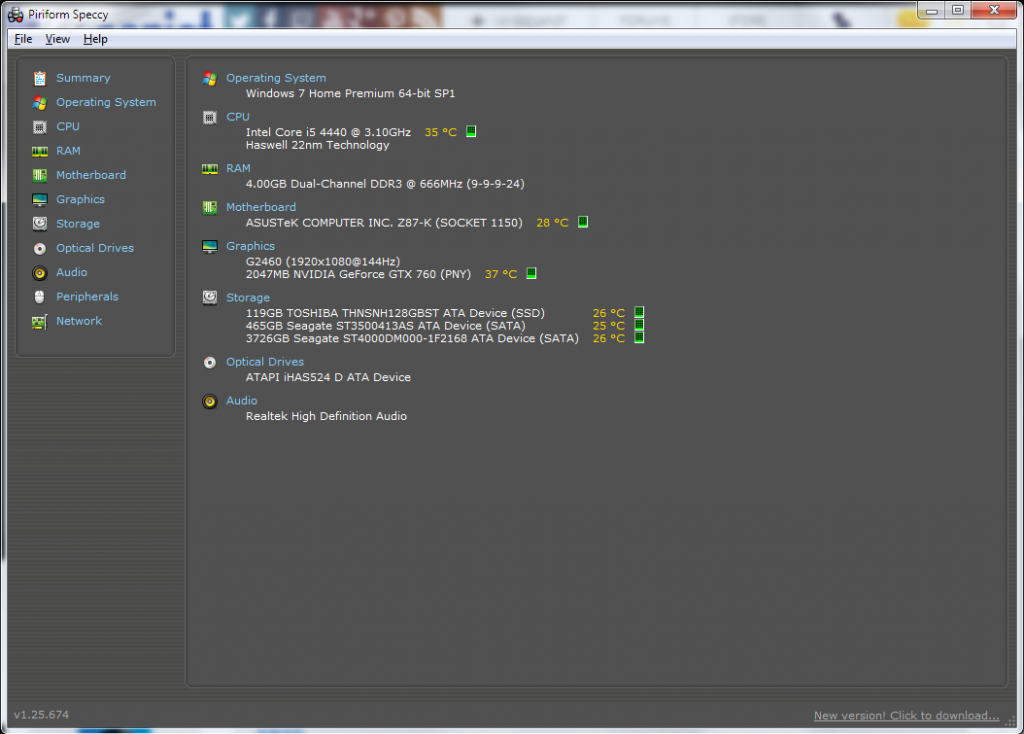
PC and graphics specs:
Now, I'm reasonably certain it's not a hardware issue and that it's a software fault somewhere. At first, I thought it might be Silverlight, which is where the problem manifests itself at the worst. When trying to use Amazon Prime Instant Video (which uses Silverlight, naturally), the screen will constantly blank out, return, blank out, return. Obviously, this renders watching anything impossible. So I followed Amazon's tips for resolving problems with it:
Tried Silverlight in another browser (switched to Firefox from Chrome): No luck.
Reinstalled Silverlight manually: No luck.
"Fixed" and reinstalled Silverlight with the "fixer" on Microsoft's tech site: No luck.
Cleared Silverlight's storage cache: No luck.
Tried resetting the DRM management: No luck.
At this point, I would simply switch to using the Flash player, but it seems that option is not available to .co.uk customers for reasons. I even tried lowering the refresh rate from 144hz to 60hz, to no avail.
It's not just Amazon the problem is limited to, however. Whenever Kaspersky pops its equivalent of a UAC message (which is rare), the screen will blank for a second. Whenever GeForce Experience checks for updates, the screen blanks (I have disabled auto-updating as a result). It's even taken to doing it while I'm gaming and generally using the PC, though I have reason to suspect that that may be GeForce Experience again.
If anyone has any suggestions on how to get this to stop happening, I will be enormously grateful.