Question for PC gamers.

Recommended Videos

FalloutJack

Bah weep grah nah neep ninny bom
Nov 20, 2008
15,485
0
0
Of course, eventually you'll get the hang of it through skin memory. The problem most gamers of either side have is that they poo-poo the other on the matter of controls at times and that's an invalid concern. The console-users and PC-users just need time and practice with the other side, as with everything. Because of this, I can consider myself some sortof Rennaissance Player.

Also, I splurged for an Alienware laptop, which has lit-up keys.

 

SonicWaffle

New member
Oct 14, 2009
3,017
0
0
Matthewmagic said:
Hey, I've been a console gamer most of my life and I have only recently moved into PC waters.
What console do you have? Because if it's a 360, you can just plug your normal wired (because when the option for wired is there, who in there right mind goes for the heavier, battery munching wireless when the wired is lighter and has a wire that can reach halfway across the planet? /tangent) controller into the PC by removing the little clip-on adaptor at the end of the wire.

Much, much, much easier than playing with a keyboard, given that controllers are specifically designed for playing games while keyboards have merely been adapted to perform them as a secondary function. Especially if you're a long-time console gamer, the feel of the pad will be second nature to you.
 

Bvenged

New member
Sep 4, 2009
1,202
0
0
I'm left handed for gaming (and home computer use), and right handed for everything else (college/uni computers, otehr people's computers, laptops). I have an exception with MMO's as I use WASD when playing them so I have easy access to the number and function keys, but alas I still play all other genres of games with the arrow keys.

I place my left hand on the mouse and my right hand on the arrow keys, with my thumb near right-CTRL (Jump); my little finger near NumP 0 & NumP 1 for crouch and prone/grab respectively; Enter key for ... well... use/enter; reload is generally "/"; the numbers stay as hotlinks/weapon swaps; and I reach up with my index finger towards the command keys (Home, Insert, End) for journals, objectives, etc.

So to answer your question, you just get used to it. Practice makes perfect, unless you're a natural. When it comes to PC gaming, I'm a jack of all trades, master of all inputs ;)

Ambidexterity FTW!

- Predominately console gamer, old-school PC gamer, currently designing a new 2012 PC.
...and I don't use southpaw controller layout. That's not for left-handed people, that's for weirdos.
 

The White Hunter

Basment Abomination
Oct 19, 2011
3,887
0
0
MY slow transitioning to PC gaming has been aided greatly by my capacity to type largely by touch only, I know where I start and can easily find all the keys from that initial typing position, so wasd is hardly difficult for me to find. The biggest problem comes when I have to look at the keyboard and it throws me off, because the only keys I don't find naturally are ctrl and caps. Which is kind of a pain but you adapt and get used to it.

But as I said to my friend who hasn't touched a console since the SNES, the best thing about the PC ios flexibility of control, use whatever you want, for a lot of games a controller can be a much better input source. With some coding I'm pretty sure you can make anything into a control input anyway, given it communicates on a bluetooth channel. (So yeah, if you really wanted you could use a wii remote.)

Ordering my new PC this week :3 Likely will do so on Friday. High end opulence here I come!
 

The White Hunter

Basment Abomination
Oct 19, 2011
3,887
0
0
Bvenged said:
Ambidexterity FTW!
I love being ambidextrous :3 Doesn't come into gaming much for me though I just do it the normal way.
At work it means I carry around a left and right handed knife at all times though. B ecause why the fuck should I awkwardly twist when my other hand can do it just as well?

Should make ambidextrous safety knives...
 

hermes

New member
Mar 2, 2009
3,864
0
0
Practice... The same way writing this down without looking at the keyboard is just practice.
 

Bertylicious

New member
Apr 10, 2012
1,399
0
0
Zeren said:
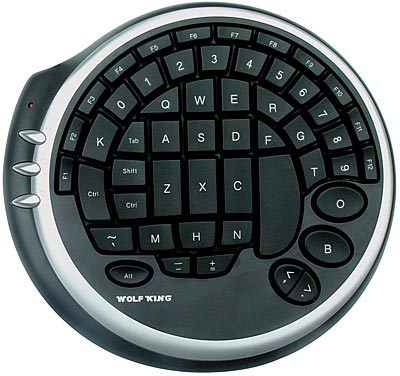
I use a wolfking gaming keyboard and have memorized it's layout. I only look at it when keybinding things in a new game.


It's a shame they stopped making them.
That looks badass and I am tempted to find something similar. Do you reckon it'd be possible to set up dual keyboards so you could have that and a regular keyboard?
 

Zeren

New member
Aug 6, 2011
394
0
0
Bertylicious said:
Zeren said:
I use a wolfking gaming keyboard and have memorized it's layout. I only look at it when keybinding things in a new game.


It's a shame they stopped making them.
That looks badass and I am tempted to find something similar. Do you reckon it'd be possible to set up dual keyboards so you could have that and a regular keyboard?
It's a usb keyboard so yes it works with a standard keyboard. I have it plugged in along with my Logitech G15 so I can type as well.
 

blackrave

New member
Mar 7, 2012
2,018
0
0
Keoul said:
I suppose the reason for the wasd setup is because of 2 reasons, tradition and ctrl.
The "ctrl" key has been used for quite a while for crouching, a pretty useful thing in some games.
Then there is "tab" being used for scoreboard and "shift" for running (all varies on the game but you get the idea)
There's also "q" and "e" being used for weapon switch.

So your suggested "esdf" layout would require remapping a lot of keys and for everyone to have to re adjust to this change. But mostly the reason is tradition.
I actually find esdf much more efficient
And anyone starting new game should at least check options and key mapping anyway
I personally end up remapping a lot of keys
 

JEBWrench

New member
Apr 23, 2009
2,571
0
0
Matthewmagic said:
How do you know your fingers are in the correct place to type? On most keyboards there is a nub you feel naturally on your index finger when your hands are in the correct position.
Personally, (and like the gaming mouse thread, this may be because of my short fingers), but since my pinkie finger falls naturally on the Caps-lock key when I use WASD, I find WASD to be useful. Your mileage may vary; though given that another person pointed out about theirs landing on the Shift key, getting used to where you pinkie falls may help. All the keys over yonder tend to be very uniquely shaped, so with a bit of practice you may find that you can identify how your fingers are placed.
 

VladG

New member
Aug 24, 2010
1,127
0
0
Matthewmagic said:
Hey, I've been a console gamer most of my life and I have only recently moved into PC waters.

My problem is that I have trouble playing in the dark, and since my computer is in the bedroom if the boy is asleep the lights are off. I'm still so new too keyboard controls that while I understand some fundamentals I never understood why wsda moves.

How do you know your fingers are in the correct place to type? On most keyboards there is a nub you feel naturally on your index finger when your hands are in the correct position.

So why not have: edfs for movement instead? your hands find them vary naturally, the same amount of the keyboard is accessible and it may even open up more options with your pinkey now that if falls naturally on "A"

I know that in most PC games you can remap the buttons but I'm afraid I wont recognize something and end up opening up the map every time I want to move. So I guess my question is: Is there a good reason for the current control scheme? and If I'm not the first one too think of this is there some preset control scheme in most games I can goto?

Thank you!
the F and J keys have tactile nubs to help with positioning.

WASD is used because the CTRL, SHIFT, SPACE, ALT and TAB keys are more distinctive because of their shape and the larger spacing makes your hand rest much more comfortably. Using ESDF forces your fingers to be either too cramped together to reach the A Q keys or too spread out to reach CTRL, SHIFT, etc. Basically WASD is the most comfortable and useful position to have for gaming.

Visibility can be solved with an illuminated keyboard.

It might be worth looking into a higher-end keyboard because the better tactile feedback makes such a huge difference (make sure you reseach this point though... price isn't a guarantee that they got it right). I'm using a Logitech G15 and I find it great (though I barely use all the features) Spacing, tactile feedback, level of illumination... even audio feedback (it's the kind that makes quite a bit of noise while typing. Some people don't like it. I find the feedback welcome)
 

jollybarracuda

New member
Oct 7, 2011
323
0
0
Yah when i first moved to mostly playing on PC I had the same issue where my hand kept moving off the WASD setup and i'd end up tossing grenades with the E key or something. It's a perfect spot to use though, once you get used to it. Shift, Tab, Ctrl, Alt, and the Q and E keys right next to it for quick actions and the whole thing is placed right at the beginning of the numeric keys that run across the top of the keyboard. So once you get used to it, it makes a lot of sense for it to be there.
 

Substitute Troll

New member
Aug 29, 2010
374
0
0
You will propably notice that you will have difficulty playing games if you switch around the controls too much. As for knowing when your fingers are in the right place, that's just something you'll get used to. I recently got a new keyboard that has an additional row of keys to the left, which made me press those instead of ctrl and shift sometimes. It took me a while, but now I'm used to it.
 

Smeatza

New member
Dec 12, 2011
932
0
0
FelixG said:
Welcome to PC gaming!

Allow me to introduce a gamers friend


the G15 gaming keyboard from Logitech
I have that exact keyboard.

It's awesome. buy it OP.

Also, play the tutorial of a game and then refine the control scheme to your needs, before the buttons become second nature. It works for me.
 

R3dF41c0n

New member
Feb 11, 2009
268
0
0
I use WASD with a standard keyboard. I've been gaming so long that I can just "feel" where the keys are. It's not too hard, just find CAPS with your ring finger, slide it over to the right and you're on A. Once your ring finger is on A your middle finger should be on W and index finger on D.

It takes practice. As for ESDF, that was the default control scheme in the first Tribes games. I understand why people use it but I just use the default control scheme (but a lot of Devs like to make C the crouch button, I always move it to Ctrl).

Use whatever works for you. Welcome to the wonderful world of PC gaming, the platform with the largest games library.
 

Easton Dark

New member
Jan 2, 2011
2,361
0
0
WASD is the only way for me.

Very few games have more keys needed for use buttons than Tab, Shift, Space, Ctrl, and Alt.

My thumb's there for the space bar, and my pinkie for the others, leaving my other three fingers to handle direction, and in some instances my index for the number keys.

Z, X, and C are sometimes used, easily enough with the index or pinkie finger. And if the game you're playing requires use keys farther than TGB except for the use of a chat function, you may want to get a more specialized keyboard.

As to why WASD is standard... it has been for awhile and, like I said, not that many games are going to have so many use keys that you'd be overwhelmed by just using WASD. I imagine it started because the number keys begin right above Q.
 

RubyT

New member
Sep 3, 2009
372
0
0
I use the NumPad 'cause I'm a Leftie. That stupid game Dead Space had several NumPad issues and made me use PL;' instead. I totally understand your pain, brother. In the dark, trying to find the right key in that mess of keys is a *****. My solution was to just quit playing Dead Space.
 

nexus

New member
May 30, 2012
440
0
0
I think the reason for WASD instead of ESDF is because WASD allows for more "utility" with the pinky. At WASD, you can easily hit Tab, Tilde, the first number, Shift.. etc. With ESDF, you can still tap these keys but it's not as comfortable, and replacing Tab, Tilde, etc. with Q,W,A or what have you, isn't as precise.

Into why we use the left side of the keyboard in general, I think thats because it's easier to sit with your hands at shoulder width, with your mouse on the right side of the desk. That is of course, if you are Right-handed. If you try to use Arrow keys with the mouse on the right, then you either have to cross your chest with your left-arm which is really poor posture for any length of time. Or, you have to move the keyboard to the left which makes it harder to type when you need to.
 

Zipa

batlh bIHeghjaj.
Dec 19, 2010
1,489
0
0
Use a back lit keyboard, they are great for this sort of thing.

Plus eventually if you use a keyboard enough you learn where all the buttons are without having to look,I have used a PC day and night for the last 8+ years (work and gaming) and now I can type whole sentences without having to even look at what my hands are doing. I typed all this for example without looking at my hands.