Question for PC gamers.

Recommended Videos

Zipa

batlh bIHeghjaj.
Dec 19, 2010
1,489
0
0
Use a back lit keyboard, they are great for this sort of thing.

Plus eventually if you use a keyboard enough you learn where all the buttons are without having to look,I have used a PC day and night for the last 8+ years (work and gaming) and now I can type whole sentences without having to even look at what my hands are doing. I typed all this for example without looking at my hands.

Of course you can rebind most games to whatever you are comfortable with, its one of the cool things about PC gaming there are enough buttons to suit everyone's personal preference. Failing that a lot of games now are compatible with Xbox and PS3 controllers.

 

nexus

New member
May 30, 2012
440
0
0
Smeatza said:
FelixG said:
Welcome to PC gaming!

Allow me to introduce a gamers friend


the G15 gaming keyboard from Logitech
I have that exact keyboard.

It's awesome. buy it OP.

Also, play the tutorial of a game and then refine the control scheme to your needs, before the buttons become second nature. It works for me.
Get the Corsair Vengeance K90 instead. I've been using it for about a year now and it is the best keyboard I've owned, hands down.

[http://imageshack.us/photo/my-images/831/img1282t.jpg/]

It uses Cherry Red mechanical keys (seriously, go mechanical), and an aluminum chassis. The wrist/palm rest is held in place by thumb screws instead of plastic clips. The construction is very solid, and nothing ever "smudges". The G1-18 keys are easier to use because they're recessed from the rest of the keyboard by about the length of one key.

I can't use a cheap plastic Logi-keyboard anymore, the difference is night and day. I'd been looking for a solid mechanical gaming keyboard for a while and found it. I wanted mechanical because it's a joy to type on, it really is.

It is a bit on the pricey side, but it's not much expensive than it's Logitech G11-G19 counterparts. You are truly paying for quality here.
 

TrevHead

New member
Apr 10, 2011
1,458
0
0
After a while you should be able to use WASD in the dark, otherwise get a small desk lamp or LED keyboard.
 

Fayathon

Professional Lurker
Nov 18, 2009
905
0
0
For typing, I just got used to where the keys are and I also still have the nubs for centering in on the home row.

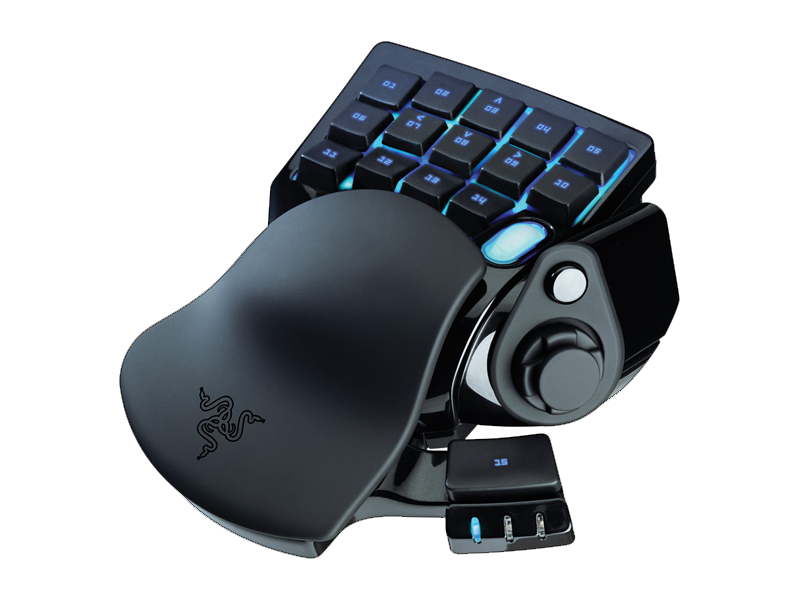
For gaming I have a second keyboard, if it can be called that. My WASD is replaced with [03][07][08][09] respectively, my [Ctrl] is [11], spacebar is below my thumbstick, E is [04], Q is [02], Tab is [01] and Shift is [06].

And the whole damn thing lights up, it's pretty sweet and it couples really well with my mouse.


Controllers don't have enough buttons to satisfy me, nor can they be programmed with macros.
 

Blade_125

New member
Sep 1, 2011
224
0
0
I'm not sure if it has been suggested yet, but you could get a controller for your PC. Most games can be used with this.
 

AzrealMaximillion

New member
Jan 20, 2010
3,216
0
0
Matthewmagic said:
Hey, I've been a console gamer most of my life and I have only recently moved into PC waters.

My problem is that I have trouble playing in the dark, and since my computer is in the bedroom if the boy is asleep the lights are off. I'm still so new too keyboard controls that while I understand some fundamentals I never understood why wsda moves.

How do you know your fingers are in the correct place to type? On most keyboards there is a nub you feel naturally on your index finger when your hands are in the correct position.

So why not have: edfs for movement instead? your hands find them vary naturally, the same amount of the keyboard is accessible and it may even open up more options with your pinkey now that if falls naturally on "A"

I know that in most PC games you can remap the buttons but I'm afraid I wont recognize something and end up opening up the map every time I want to move. So I guess my question is: Is there a good reason for the current control scheme? and If I'm not the first one too think of this is there some preset control scheme in most games I can goto?

Thank you!
I was in the same boat as you a year ago friend. Let me tell you this, you can take the advice of getting a light up keyboard. But to be honest, after sometime, you'll get used to it quicker than you think. With low light you'll memorize the keys within time. I light up keyboard is a very nice option though.
 

Signa

Noisy Lurker
Legacy
Jul 16, 2008
4,746
6
43
Country
USA
I used to be an arrow key user, but then I got this:

Now I'm able to use WASD just fine. The thing that bothered me about WASD is how cluttered it was around the movement keys. The only thing that bothered me about the arrows was having to reach for 1-9 for weapons swaps, and the mouse wheel took care of most of that anyway. The num-pad wasn't an option, because 0, 1, and 4 almost always got used for some function like reloading and jumping (game dependent). I know Jedi Knight was a bit of a breeze being able to configure all 15 surrounding keys with force powers.

So I have one question for anyone who reads this: who else uses the RMB as a jump key? I don't use it in every game, but I love what it does for me.
 

Jfswift

Hmm.. what's this button do?
Nov 2, 2009
2,393
0
41
Bertylicious said:
Zeren said:
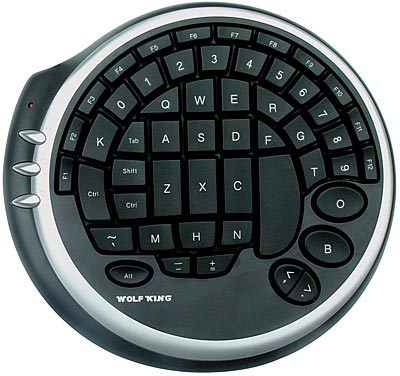
I use a wolfking gaming keyboard and have memorized it's layout. I only look at it when keybinding things in a new game.


It's a shame they stopped making them.
That looks badass and I am tempted to find something similar. Do you reckon it'd be possible to set up dual keyboards so you could have that and a regular keyboard?
You can still find them used. There's two up in eBay right now and another on amazon.

http://item.mobileweb.ebay.com/viewitem?itemId=261134751688&index=1&nav=SEARCH&nid=47021078436
 

EvilMaggot

New member
Sep 18, 2008
1,428
0
0
from many many years of pc gaming my fingers and hands have gotten used to a keyboard layout :) so i dont need at all to look, you learn it on the go while playing games and at somepoit it just sits.


also..im using a G15 second generation

as someone else wrote above somewhere, i dont like all those.. special control thingy's.. i like a normal keyboard layout because i know where every letter and number is by heart, and i like all the buttons :D back in the WoW days i had sooo many macro's a controller or those special WASD controllers would never satisfy me with ^^ and no i wont touch Razer.. thats just a personal thing.. i dont like thier products and lets leave it at that ^^
 

FEichinger

Senior Member
Aug 7, 2011
534
0
21
Well, I'm a programmer, so I naturally use a keyboard day in day out ... Which also means I have a ridiculous typing speed. As a result, I have never actually felt this need to remap the base keys, or use a vastly different keyboard layout.
ESDF also feels very unnatural for me. Probably because my pinky is already deformed due to me using it only for Shift, LT and Ctrl ... I'd probably hurt myself if I were to use the pinky for QAY. But, as I started: It's a matter of growing into it.
Stick with what feels most comfortable to you, don't force yourself to change. Remap keys when needed. Or get a gamepad.
 

epidemia

New member
Nov 24, 2012
53
0
0
never move your middle finger from the W key unless its to press the S is my general rule of thumb, but Im in the same boat as you. As a child of the 70s, keyboards arent really my forte unlike some people who can find all of the keys blindly, sometimes I have to look.
 

Woodsey

New member
Aug 9, 2009
14,548
0
0
I've always assumed WASD was chosen because your arms are then square, and your fingers align with the edge of the keys. You should get used to it, although feel free to remap if you really want.
 

Quesa

New member
Jul 8, 2009
328
0
0
I shudder to think about our typingless future where people are better with virtual keys they need to see to type :/ I could do 80 wpm when I was 6 years old, I learned to type and I never have to look at the keyboard to orient my hands. Obviously in haste I'll line up incorrectly once a week or so, bit resettomg tje, os qiocl.
 

gorfias

Unrealistic but happy
Legacy
May 13, 2009
7,566
2,068
118
Country
USA
Lot of these backlit keyboards. You can even make them yourself.


Vardermir

New member
Jan 18, 2009
24
0
0
For my fingers at least, when I try to use esdf, the way the keys are aligned on the keyboard actually puts the e slightly more off center than w is. So this ends up making my middle finger touch my ring finger, which is slightly annoying. Other than that, I can see no reason why you couldn't use esdf, depending on the shape of your own hands.
 

Tanakh

New member
Jul 8, 2011
1,512
0
0
Matthewmagic said:
How do you know your fingers are in the correct place to type? On most keyboards there is a nub you feel naturally on your index finger when your hands are in the correct position.

So why not have: edfs for movement instead? your hands find them vary naturally, the same amount of the keyboard is accessible and it may even open up more options with your pinkey now that if falls naturally on "A"
I won't read the tread, but regarding this 2:

- Backlit keyboards are the usual solution to playing in the dark.

- edsf is indeed a very common setup. Use it if you want.
 

wetfart

New member
Jul 11, 2010
307
0
0
If you have a corded xbox 360 controller, you can just plug it into your computer. There are a few games that I prefer having the gamepad.
 

kreekgod

New member
Jul 12, 2010
27
0
0
the reason for wasd is actually quite simple

a long time ago, games used to use arrow keys (movement in the right hand and most other controls in the left)
then the mouse became a primary form of visual control due to its precise analog control, it simply works better for controlling a camera then any other method ive ever found, however the most mice are primarily right handed, meaning the controls for movement needed to be shifted over to the left hand, wasd was chosen simply because its near every other left handed control key, and on the far left of the keyboard where it would be easy to reach

hand placement is easy once you get used to it (it was a pain to unlearn arrows for years for me), try formulating the placement based on the unique size and shapes of the keys around it, the A key is just to the right of the caps-lock key, the caps-lock is the just a fraction larger then the tab key, and in the middle of the keyboard, find tab, move right 1, you have your placement, all this is done in micro seconds after you get used to it, and you don't even think about it

glowing keys or light up keyboards can help, however, try ambient light, take a desk lamp, and face it toward a nearby wall, the resulting reflected light will be dim enough to be comfortable but bright enough to see your keys

on-top of all this, don't forget, you can almost always also use a game-pad, if your more comfortable with that
 

Sigmund Av Volsung

Hella noided
Dec 11, 2009
2,998
0
0
Keoul said:
I suppose the reason for the wasd setup is because of 2 reasons, tradition and ctrl.
The "ctrl" key has been used for quite a while for crouching, a pretty useful thing in some games.
Then there is "tab" being used for scoreboard and "shift" for running (all varies on the game but you get the idea)
There's also "q" and "e" being used for weapon switch.

So your suggested "esdf" layout would require remapping a lot of keys and for everyone to have to re adjust to this change. But mostly the reason is tradition.
Don't forget shift for Sprinting!

Makes your pinkie work for it!
 

Solo-Wing

Wanna have a bad time?
Dec 15, 2010
3,641
0
0
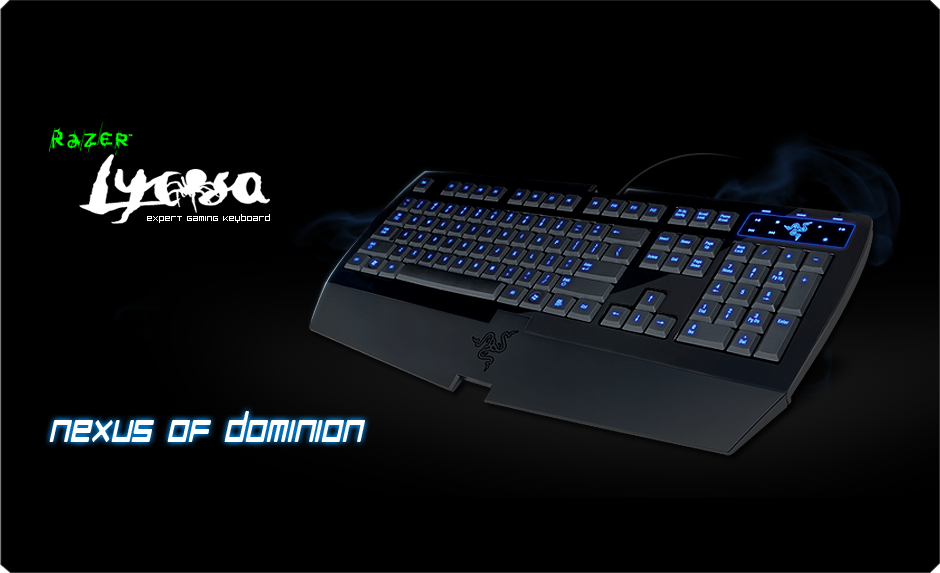
I never have to worry cause I got a Keyboard with backlight. If this is a problem I would recommend you get one. The Lycosa is good.
http://www.razerzone.com/gaming-keyboards-keypads/razer-lycosa

(I got the Lycosa mirror, Glossy keys instead of rubber)

You can switch between no lights, WASD light up only, and the entire keyboard. Plus this thing has Key mapping if you want to change your play style. And this is not a mechanical Keyboard so it is pretty quiet.

If you can't do it I usually have my hand so the Pinkie is always on the left shift. I can easily check the length of the key it is on and know cause the shift is longer. Then you want the ring on A, Middle on W, and index on D with thumb on the space. Keep it like this and it will become second nature to you.